Nederlands
Vienna Ensemble Pro 8: The Professional Buying Guide 2026
The days of viewing Vienna Ensemble Pro 8 as a simple MIDI host are officially over. You likely know the frustration of a complex session grinding to a halt because your CPU hit its limit or your video engine lagged during a critical scoring cue. These technical bottlenecks don’t just waste time; they disrupt the precise creative flow that professional composers require. When your DAW crashes due to RAM overload, it is not just a software failure; it is a direct loss of billable hours.
This guide demonstrates how to transform your studio into a stable, high-performance environment that handles massive sample libraries and immersive audio formats up to 22.2. We promise to clarify exactly how this software manages your processing load and integrates network-based video hosting to eliminate local machine strain. We will examine the latest 8.1 updates, including AI-driven MCP server capabilities and the specialized 8V video engine, to help you determine if this upgrade is the right move for your 2026 production requirements.
Key Takeaways
- Learn how to stabilize your DAW by offloading heavy virtual instrument processing to secondary computers via a local network.
- Understand the functional differences between the standard version and the Video Pro (8V) edition for synchronized, high-performance video playback.
- Calculate the specific RAM and hardware specifications required to run Vienna Ensemble Pro 8 efficiently within a professional scoring environment.
- Navigate the transition to iLok licensing and manage multi-license tiers across complex multi-machine studio setups.
- Identify the advantages of procurement through an authorized reseller to ensure genuine licensing and access to professional technical support.
What is Vienna Ensemble Pro 8 and Why is it the Industry Standard?
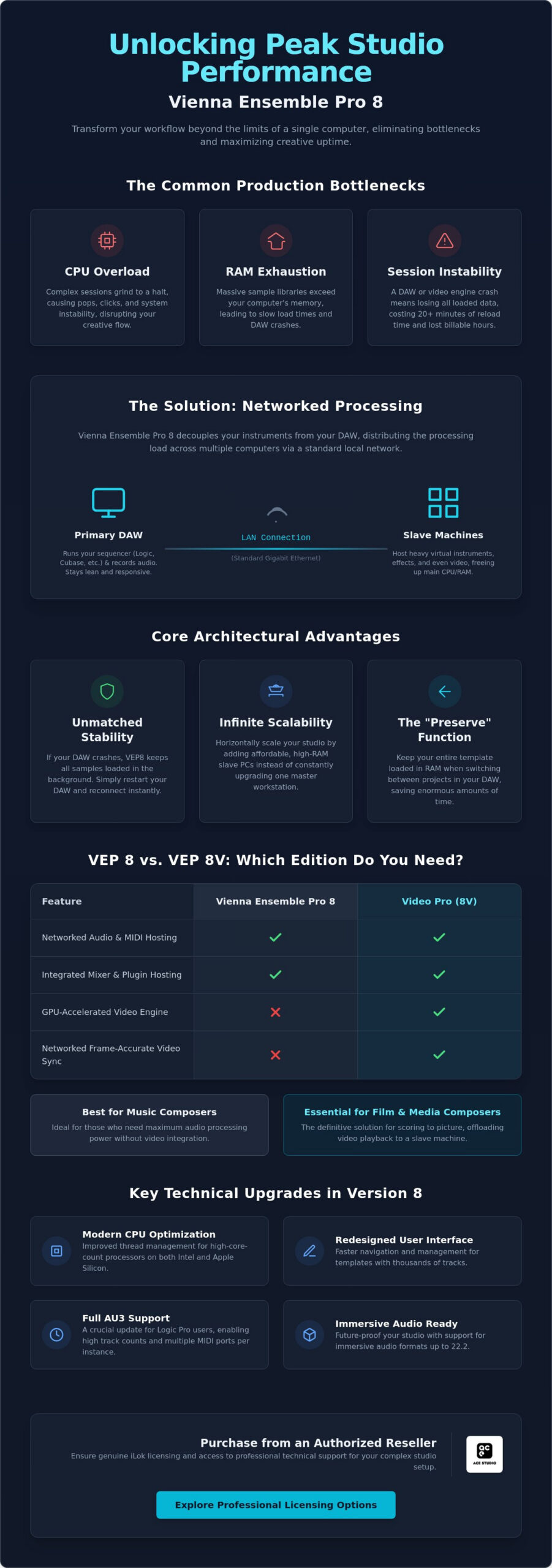
Vienna Ensemble Pro 8 is a sophisticated cross-platform MIDI and audio hosting application designed specifically for networked studio environments. At its core, the software functions as a bridge that allows your primary Digital Audio Workstation (DAW) to offload the heavy computational burden of virtual instruments and effects to secondary slave computers via a standard Local Area Network (LAN). Developed by the Vienna Symphonic Library, it has become the standard for media composers and sound designers who require more processing power than a single workstation can provide.
The software’s primary advantage is its decoupled architecture. In a traditional setup, a DAW crash usually results in the loss of all loaded sample data, requiring a lengthy reload process that can take 20 minutes or more for large orchestral templates. Vienna Ensemble Pro 8 runs as a separate process; if your DAW fails, your samples remain loaded and ready in the background. It maintains broad compatibility across the industry, supporting VST, VST3, AU, and AAX formats on both Windows and macOS. This flexibility is essential when moving beyond the limitations of stock plugins that are often restricted to internal DAW hosting and local CPU resources.
The Evolution from Version 7 to 8
The transition to version 8 brought significant architectural refinements tailored for 2026 hardware standards. Developers optimized thread management to better utilize high-core-count processors, resulting in improved CPU efficiency across both Intel and Apple Silicon systems. The user interface was redesigned to facilitate faster navigation, which is a critical requirement when managing thousands of tracks in a complex scoring template. These updates ensure that the software remains responsive even when the system is under extreme load, providing a smoother experience for high-end production.
Solving the “One Computer” Limitation
Professional composers eventually hit a hardware ceiling where a single machine cannot handle the RAM or CPU requirements of modern sample libraries. Vienna Ensemble Pro 8 solves this by allowing you to scale your studio horizontally. Instead of purchasing an expensive, top-tier workstation every two years, you can add affordable, high-RAM slave PCs to your network. This approach streamlines the workflow for media professionals, enabling them to maintain massive “always-on” templates without taxing the primary workstation’s resources. It’s a pragmatic solution for studios that need to expand their capabilities without a total hardware overhaul.
Key Features and the New Video Pro Integration
Vienna Ensemble Pro 8 is now available in two distinct configurations: the standard version and the specialized Video Pro (8V) edition. While the standard license provides high-performance audio and MIDI hosting, the 8V edition introduces a GPU-accelerated video engine. This distinction is vital for professionals who need to maintain a lean primary workstation while managing high-resolution video assets on a secondary machine. Both versions maintain the stability discussed in the previous section, ensuring that your samples remain loaded even if your DAW requires a restart.
One of the most significant technical updates for 2026 includes full AU3 support. This specifically addresses the needs of Logic Pro users, allowing them to manage high track counts and multiple MIDI ports through a single plugin instance. Additionally, the software’s integrated mixing environment provides full automation and plugin hosting. This allows you to process virtual instruments within the VE Pro server before the audio ever reaches your DAW. When building out your signal chain, pairing this hosting capability with carefully selected professional mastering plugins ensures that the audio leaving your VE Pro instances meets the highest production standards before it reaches your final mix bus. The “Preserve” function remains a cornerstone of the professional workflow; it keeps your sample libraries loaded in RAM even when you close one DAW project and open another. If you need to upgrade your current setup, you can explore professional licensing options to find the configuration that matches your studio’s scale.
Deep Dive: The Video Pro Expansion
For film composers, video playback is often the most resource-intensive aspect of a session. The Video Pro plugin enables frame-accurate synchronization across your network. By hosting video on a slave machine, you save significant CPU cycles on your primary workstation. The system supports multiple video formats and allows you to route the video stream from the slave back to your main studio monitor with minimal latency. Detailed specifications regarding supported codecs and hardware acceleration are available on the Vienna Ensemble Pro 8 Official Website.
Workflow Enhancements for 2026
Efficiency in 2026 is driven by metadata management. The updated search and filter functions allow users to navigate massive plugin libraries instantly. Visual feedback has also seen an overhaul; signal routing and peak monitoring are now more intuitive, reducing the time spent troubleshooting complex signal paths. Connection times between the DAW and the server are faster than in previous versions. This improvement is essential for rapid project switching and maintaining a steady creative rhythm during high-pressure deadlines.
Network Rendering and System Requirements
The infrastructure of your studio determines the ceiling of your productivity. To run Vienna Ensemble Pro 8 effectively, a dedicated Gigabit LAN connection is the absolute minimum requirement. For professionals managing high-track-count orchestral templates or immersive audio formats up to 22.2, a 10GbE network is recommended to ensure the lowest possible latency. You should avoid Wi-Fi entirely; wireless protocols lack the stability required for real-time audio and MIDI packet transmission.
Hardware specifications vary based on your specific workload. The minimum requirements for Windows include a 64-bit version of Windows 10 with an Intel Core i3 or AMD Athlon 64 X2 processor. Mac users require at least macOS 12 Monterey running on an Intel Core i3 or Apple M1 processor. However, for 2026 production standards, we recommend Windows 11 or macOS 14 Sonoma or higher, paired with Intel Core i7/i9/Xeon or Apple Silicon M-Series processors. RAM management is equally critical. You should calculate your memory needs based on your sample library preload sizes, ensuring your slave machines have enough overhead for the OS and the Vienna Ensemble Pro 8 server itself. Additionally, a fast separate hard drive, rated at 7200 rpm or faster, is essential for streaming samples without bottlenecks.
Setting Up Your First Slave Computer
Connecting a slave machine follows a specific logical sequence. First, establish a physical Ethernet connection between your master DAW and the slave computer. We recommend configuring static IP addresses (for example, 192.168.1.10 and 192.168.1.11) rather than relying on DHCP. This prevents the master DAW from losing the server connection if the router reassigns addresses after a reboot. Once the hardware is linked, launch the VE Pro Server on the slave before attempting to connect the plugin from your primary workstation. If you experience latency, check that your network switch supports the full bandwidth of your adapters and that “Energy Efficient Ethernet” settings are disabled on your network cards.
Audio over LAN: Maximizing Throughput
Throughput efficiency depends heavily on your buffer settings and instance organization. Within the VE Pro plugin, you can choose between “none,” 1, 2, or 3 buffers. While “none” offers the lowest latency, it places the highest demand on your network and CPU; most professionals find that 1 or 2 buffers provide the best balance of stability and performance. You should use multiple instances to categorize instrument groups, such as woodwinds, brass, and strings, which allows for better multi-core distribution. Insufficient network bandwidth directly correlates with increased packet loss, which manifests as audible dropouts and synchronization errors during playback. By optimizing the thread settings in the preferences to match your slave machine’s core count, you can ensure that the workload is distributed evenly across the processor. For a deeper technical breakdown of how to configure and troubleshoot this process, our guide on Vienna Ensemble Pro netwerk rendering and distributed processing covers the protocol-level synchronization tasks that separate a stable multi-machine setup from one that introduces instability.
Licensing, Upgrades, and iLok Management
The transition from the legacy eLicenser system to iLok is now complete. For users of Vienna Ensemble Pro 8, this move provides a more flexible and modern approach to digital rights management. You no longer need to rely on the fragile physical hardware dongles of the past. Instead, the software requires one license for every computer running a server instance. This means if you have one master workstation and two slave PCs, you will need three separate licenses to maintain a fully networked environment.
License tiers are structured to accommodate growing studios. Typically, your first purchase includes a primary license, while additional licenses for slave machines are available at a reduced rate. If you are currently running version 6 or 7, the upgrade path to Vienna Ensemble Pro 8 is straightforward. You must first ensure your older licenses are registered in your Vienna Symphonic Library account before purchasing the upgrade. Once the new license is deposited into your iLok account, the older version is replaced, granting you access to the 2026 performance enhancements and the updated video engine options discussed previously.
You have two primary options for activation: iLok Cloud or a physical iLok USB key. iLok Cloud is convenient for studios with a permanent, high-speed internet connection, as it eliminates the need for physical hardware. However, if your studio environment requires offline stability or if you frequently travel between different scoring stages, a physical iLok key remains the most reliable choice. It ensures your licenses are always available, regardless of network status.
Managing Your Professional Audio Licenses
Registration is handled through the VSL Vienna Assistant, a centralized utility that manages downloads, installations, and license synchronization. After completing your purchase, you will receive an activation code that must be entered into this assistant. Maintaining organized audio software license management is critical for studio uptime. If you lose access to your iLok account, recovery typically requires proof of purchase and a valid iLok Zero Downtime subscription. Without these precautions, a lost account can lead to significant production delays.
Meershop Support for Digital Licenses
When you purchase your software through an authorized reseller, you receive instant digital delivery of your activation codes. We provide technical support to assist with the initial registration hurdles, ensuring your licenses are correctly assigned to your professional iLok account. This direct support path is essential for professionals who cannot afford downtime during a project rollout. You can get your Vienna Ensemble Pro 8 license now to begin optimizing your network workflow immediately.
Why Buy Vienna Ensemble Pro 8 from Meershop?
Procuring professional software requires a partner that prioritizes reliability and technical accuracy. As an authorized reseller, Meershop provides guaranteed genuine licenses for Vienna Ensemble Pro 8, ensuring you have immediate access to full manufacturer support and future updates. We operate as an expert facilitator, removing the friction often associated with high-end software acquisition. Our team understands the nuances of media production, from buffer settings to network throughput, allowing us to serve as a technical resource rather than a simple storefront. For studios looking to build a complete production environment, our guide to professional DAW plugins and building an expert studio ecosystem provides a methodical framework for selecting and integrating high-end assets alongside Vienna Ensemble Pro 8.
Efficiency in the studio extends to your administrative workflow. Consolidating your software purchases through a single professional source simplifies your licensing and accounting processes. You can acquire your network hosting solution alongside industry-standard sample libraries like the Eastwest Hollywood Orchestra Opus Edition to build a complete, production-ready environment. For studios looking to maximize value, exploring the professional audio bundles Netherlands professionals rely on can provide integrated hardware-software ecosystems that eliminate compatibility friction from the ground up. Our transparent pricing model ensures that you see clear professional costs without the hidden international transaction fees or currency exchange fluctuations that often complicate direct purchases from overseas developers.
The Meershop Advantage for Dutch Studios
We serve the national professional audio community with tailored advice and localized support. Our curated catalog is designed for high-end users who require tools like Pro Tools Ultimate to maintain their competitive edge. We provide reliable digital delivery and business-professional invoicing that complies with regional taxation requirements. This methodical approach to distribution ensures that your studio remains operational and your software assets are correctly documented for business purposes.
Ready to Optimize Your Workflow?
Determining the right configuration for your studio is a pragmatic decision based on your specific project needs. Whether you require the standard Vienna Ensemble Pro 8 license for MIDI hosting or the Video Pro (8V) edition for synchronized network video playback, we provide the necessary infrastructure to scale your orchestral template. Our team is available to offer advice on hardware synchronization and license distribution across multiple machines. You can secure your Vienna Ensemble Pro 8 license today at Meershop and eliminate the technical bottlenecks that disrupt your creative process.
Future-Proof Your Studio Infrastructure
Optimizing a professional scoring environment requires tools that eliminate technical distractions. We have analyzed how Vienna Ensemble Pro 8 serves as the definitive solution for offloading computational tasks to slave machines, ensuring your primary workstation remains responsive during complex sessions. The integration of the GPU-accelerated video engine in the 8V edition and the streamlined transition to iLok licensing provide the scalability and stability necessary for 2026 production standards.
Maintaining a crash-free workflow is a pragmatic requirement for high-end media production. By utilizing a dedicated network setup and efficient RAM management, you ensure that your sample libraries stay loaded and your creative rhythm remains uninterrupted. As an authorized Vienna Symphonic Library reseller, Meershop provides the technical expertise and administrative clarity you need to upgrade your setup without friction. You can purchase Vienna Ensemble Pro 8 at Meershop to benefit from instant digital delivery and expert support for professional pro audio workflows. It is time to remove the hardware limitations of the past and build a studio that scales with your creative ambitions.
Frequently Asked Questions
Do I need a physical iLok dongle to run Vienna Ensemble Pro 8?
A physical iLok USB key is not mandatory for running Vienna Ensemble Pro 8. You can choose to activate your license via iLok Cloud, which requires a persistent internet connection. However, many professionals prefer the physical USB key for offline stability and portability between different studio locations. This ensures your licenses are always available, even if your internet connection fails during a session.
Can I run Vienna Ensemble Pro 8 on a single computer without a network?
Yes, you can run the software on a single machine without any external network connections. This setup is beneficial for offloading virtual instrument processing into a separate memory space, which improves DAW stability. It uses a local internal network protocol to communicate between the DAW and the hosting server, preventing the DAW from crashing when large sample libraries exceed its local memory limits.
What is the difference between VE Pro 8 and VE Pro 8V?
The primary difference is the integrated video engine found only in the 8V edition. While the standard Vienna Ensemble Pro 8 focuses on audio and MIDI hosting, the 8V version allows you to stream frame-accurate video from a slave machine to your master workstation. This offloads the heavy graphical processing required for video playback, saving significant CPU cycles on your primary composing machine.
How many licenses are included in a standard purchase of VE Pro 8?
A standard purchase includes a single license. You must have one license for every computer that runs the server software. If your setup includes one master and two slave machines, you will need to purchase three licenses in total. Additional licenses are typically available at a lower price point than the initial purchase to help studios scale their networks affordably.
Is Vienna Ensemble Pro 8 compatible with Apple Silicon (M1/M2/M3) natively?
Yes, the software is fully compatible with Apple Silicon processors. It runs natively on M1, M2, and M3 chips, ensuring maximum performance and efficiency without the need for Rosetta 2 translation. This native support is critical for maintaining low latency and high track counts in high-demand scoring sessions on the latest Mac hardware.
Can I host third-party VST plugins like Kontakt inside VE Pro 8?
You can host any third-party VST, VST3, or AU plugin within the environment. This includes popular samplers like Kontakt, Play, or Sine. The software acts as a universal host, allowing you to organize all your virtual instruments into a single, manageable template that remains active and loaded even if your DAW process requires a restart.
How do I upgrade my existing version 7 license to version 8?
To upgrade, you must purchase a specific upgrade license and have your version 7 license registered in your Vienna Symphonic Library account. The process is managed through the Vienna Assistant utility. Once the upgrade code is applied, the new license will be deposited into your iLok account, replacing the older version and granting access to the 2026 features.
Does VE Pro 8 support MIDI 2.0 protocols in 2026?
Yes, version 8.1 and higher supports MIDI 2.0 protocols. This allows for higher resolution controller data and improved expressive capabilities when used with compatible hardware and software. This update ensures your studio remains current with the latest industry standards for musical data transmission, providing more precise control over your virtual instrument performances.
YOU MIGHT ALSO LIKE