Nederlands
Guide to Professional Audio Software License Management in 2026
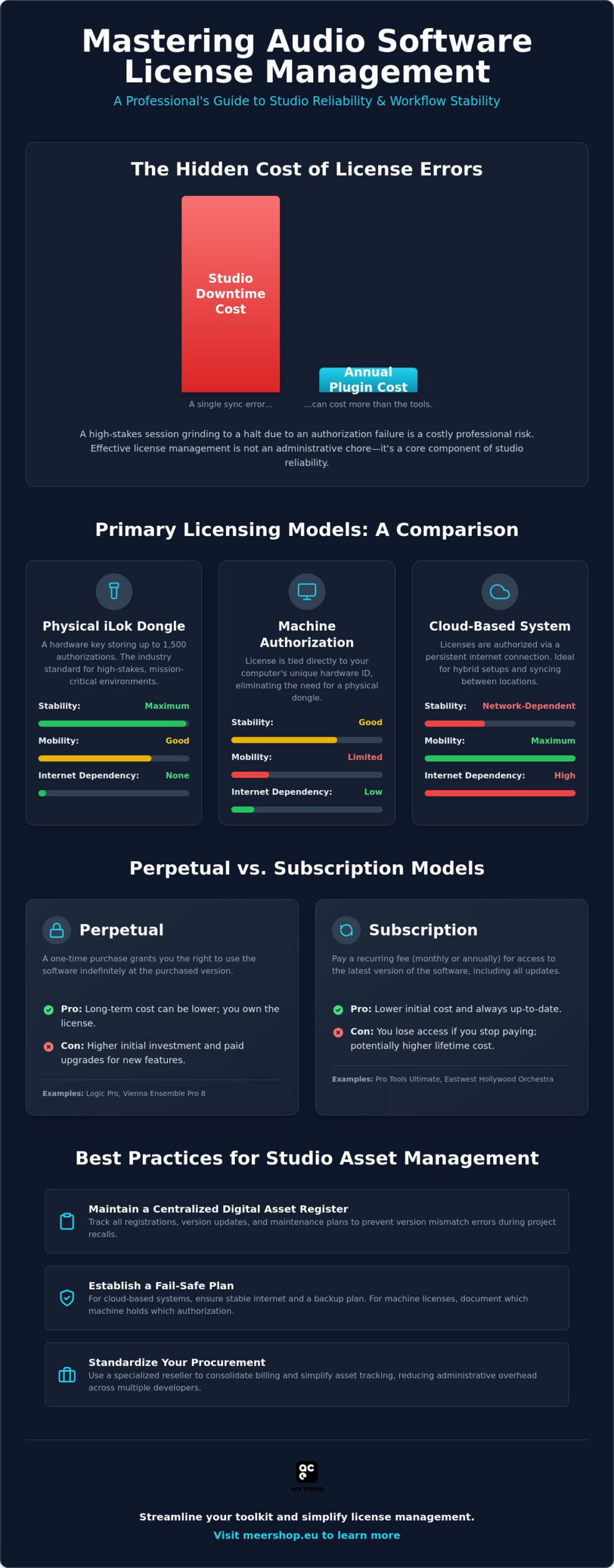
A single synchronization error in your license manager can cost more in studio downtime than the annual cost of the plugins themselves. Most professionals understand the frustration of a high-stakes session grinding to a halt because a cloud authorization failed or a physical dongle wasn’t recognized. Mastering audio software license management is a technical necessity when your workflow involves balancing perpetual licenses for tools like Logic Pro with subscription models for Pro Tools Ultimate. It’s an administrative burden that often distracts from the core work of audio production.
Establishing a robust licensing system is a critical component of studio reliability, not just a back-office chore. This guide provides the technical strategies required to master these complexities and ensure your system remains fail-safe. We outline how to create a streamlined licensing workflow that handles everything from iLok Cloud transitions to perpetual versus subscription value assessments. We also cover methods for centralized asset control to help you maintain a professional, uninterrupted environment.
Key Takeaways
- Compare the reliability of physical iLok dongles against machine-based and cloud-based authorization systems to select the most stable option for your studio environment.
- Implement a professional framework for audio software license management to eliminate synchronization errors and prevent session-stopping authorization failures.
- Evaluate the long-term financial and operational impact of perpetual licenses versus subscription models for major tools like Pro Tools Ultimate and the Eastwest Hollywood Orchestra Opus Edition.
- Learn how to maintain a centralized digital asset register to track registrations, version updates, and maintenance plans across multiple software developers.
- Understand the administrative benefits of standardizing your procurement process through a specialized reseller to consolidate billing and simplify asset tracking.
Understanding Audio Software License Management in 2026
Software License Management (SLM) in the professional audio sector is the systematic process of documenting, authorizing, and maintaining the legal rights to use digital tools. For the modern recording studio, this is no longer a simple matter of keeping a list of serial numbers. It’s a technical discipline that ensures the digital signal chain remains as stable as the physical one. A Software license manager acts as the central hub for these permissions, bridging the gap between a developer’s server and your local workstation.
Digital asset tracking is now as vital as hardware maintenance. Engineers often spend significant resources on acoustic treatment and microphone selection but neglect the digital foundation. If a tube fails in a preamp, you swap it. If a license synchronization fails, your entire session stops. Effective audio software license management prevents project recalls caused by missing plugin versions or unauthorized software. It ensures that every asset is accounted for before the client arrives.
The evolution of licensing has moved from static serial numbers to sophisticated systems involving machine IDs and persistent cloud connections. This shift improves security but increases the administrative load. Poor management leads to unauthorized plugins during project handovers and session crashes. It’s a professional risk that can be mitigated through disciplined organization.
The Core Components of Audio SLM
Professional SLM relies on three pillars. First, entitlement management ensures you know exactly which versions you own. This prevents version mismatch errors during project recalls. Second, compliance keeps your studio legal during hardware upgrades or business audits. Finally, inventory control tracks multi-seat licenses across different workstations. This is essential for facilities running multiple rooms with shared assets like the Sonnox Vocal Production Bundle or Vienna Ensemble Pro 8. You must know where every authorization is at all times.
Why 2026 Requires a New Approach
The studio environment has changed. Hybrid setups are the standard. Engineers now need to sync licenses between a home edit suite and a professional tracking room without friction. High-bandwidth cloud authorization has replaced offline workflows for many, requiring constant internet stability and sophisticated failover plans. Additionally, the complexity of modern bundles, such as the Eastwest Hollywood Orchestra Opus Edition, demands a granular approach to management. These libraries contain vast amounts of data tied to specific licensing tiers. Without a structured management plan, session crashes during high-track-count orchestral mockups become a frequent and costly reality.
Primary Licensing Models: iLok, Machine, and Cloud-Based Systems
Modern studios use a tiered approach to audio software license management to balance mobility with stability. While cloud-based systems have gained traction, physical hardware remains the industry standard for high-stakes environments. The third-generation iLok USB-A ($49.95) and USB-C ($59.95) are essential for professionals who cannot risk internet dropouts. These physical dongles can store up to 1,500 authorizations, providing a centralized hardware vault. For live sound engineers or those in remote recording locations, the physical key ensures that your tools remain active regardless of local network conditions.
Machine-based authorization offers a middle ground by tying the license directly to your computer. Machine ID is a unique hardware fingerprint used for local authorization. This method locks the license to a specific motherboard or hard drive. While it eliminates the need for a dongle, it complicates hardware upgrades and repairs. Implementing best practices for managing software licenses involves documenting which machine holds which authorization to avoid losing access during a system failure or upgrade cycle.
Most developers now require proprietary managers like Waves Central, Native Access, or Vienna Assistant. These applications handle updates and repairs but add a layer of background processes that must be monitored. Managing these effectively is part of a professional audio software license management strategy. If you’re looking to simplify your procurement and license tracking, you can find many of these industry-standard tools at Meershop.
iLok Cloud vs. Physical iLok
iLok Cloud allows for authorization without a dongle, provided you have a persistent internet connection. This is ideal for mobile edit suites but remains risky for live environments where connectivity is unpredictable. For critical sessions, Zero Downtime (ZDT) coverage is a necessary insurance policy. It provides temporary licenses if your physical iLok is lost or broken, ensuring you don’t lose access to essential assets during a project. If you need to move a license between accounts, be aware of the standard $25 transfer fee per license.
Centralizing Authorizations
Efficiency starts with administrative consistency. Use a single, dedicated studio email for all developer accounts to prevent “lost” or orphaned licenses. This centralized approach simplifies version control and makes legacy support much easier to navigate when revisiting old projects. It also streamlines the process of auditing your inventory before a major OS update, ensuring that every plugin is accounted for and compatible with your new environment.
The Subscription vs. Perpetual License Debate
Deciding between perpetual ownership and subscription access is a fundamental business choice that dictates your studio’s long-term overhead. A perpetual license follows the traditional “buy once, own forever” model. It offers the security of a fixed asset, but it often carries hidden maintenance costs. Many developers use update plans to gatekeep compatibility with new operating systems. Without these paid updates, a perpetual license can quickly become a legacy bottleneck. Effective audio software license management requires a clear-eyed look at these two models to determine which fits your specific production cycle.
Subscription models have shifted the focus from ownership to access. For a monthly or annual fee, you gain entry to massive libraries that would otherwise require a significant upfront investment. Professional workflows often utilize the Pro Tools Ultimate 1 Year Subscription for its industry-standard features. Hybrid approaches like rent-to-own provide a middle ground, allowing you to build equity in a tool through monthly installments. Calculating the five-year cost of ownership is essential. While a subscription might look cheaper in year one, a perpetual license often becomes the more cost-effective asset by year three. Implementing best practices for software license management helps studios avoid overspending on redundant subscriptions while maintaining a lean, high-performance toolkit.
When Subscriptions Make Sense
Subscriptions are ideal for project-based budgeting. If a specific film score requires the deep textures of the Eastwest Hollywood Orchestra Opus Edition, a temporary subscription allows you to access the library without a permanent capital expenditure. This model also lowers the barrier to entry for comprehensive bundles like Vintage Vault UVI. From a business perspective, subscriptions simplify tax accounting. They’re typically categorized as operating expenses (OPEX) rather than capital assets, which can be advantageous for annual cash flow management.
The Case for Perpetual Ownership
Perpetual licenses offer a level of stability that subscriptions can’t match. If you’re working in a remote scoring environment or a live mixing scenario with no internet, you can’t rely on a subscription server to verify your credentials. Owning your software ensures project compatibility ten years down the line. You won’t lose access to your session files just because a developer changed their pricing tier or went out of business. For a professional studio, building a portfolio of perpetual assets creates long-term value and ensures you’re never more than a hardware dongle away from a functional session. It’s a foundational part of audio software license management that prioritizes reliability over convenience.
Best Practices for Studio Asset Management
Maintaining a professional studio requires more than just high-end hardware. It demands a systematic approach to audio software license management to ensure that every digital tool is accounted for and functional. A master digital asset register is the foundation of this process. While some facilities use dedicated asset management software, a well-structured spreadsheet is often sufficient for most studios. This register should include the developer name, license type, purchase date, and the specific machine ID or iLok account associated with the authorization.
Standardizing your procurement process is another critical step. Purchasing through a single source simplifies administrative tasks by consolidating invoices and centralizing support. This approach makes it easier to track your spending and manage renewals. Regular audits are necessary to maintain system health. You should inventory your iLok account every quarter to identify unused licenses or pending updates. Disaster recovery plans are equally vital. If your main DAW workstation fails, you must have a documented process for deactivating licenses remotely or utilizing ZDT coverage to minimize downtime. Studios in the Benelux region looking to simplify this process can explore the professional audio bundles Netherlands professionals rely on for integrated hardware-software solutions that reduce licensing complexity from the ground up.
Organizing Your Licenses
Efficiency depends on how you group your assets. Organizing licenses by developer and expiration date prevents unexpected service interruptions. For example, tracking your Pro Tools Ultimate 1 Year Subscription renewals ensures that you don’t lose access to your primary workstation during a deadline. You must also distinguish between NFR (Not For Resale) and retail licenses. NFR licenses often have different support terms and cannot be transferred; they should be flagged separately in your register to avoid confusion during future studio upgrades.
Security and Compliance
Protecting your digital assets is a security priority. Enable Two-Factor Authentication (2FA) on your iLok and developer accounts to prevent unauthorized access. Using “cracked” software is a significant risk that professional studios cannot afford. These installers often contain malware that leads to system instability and metadata corruption within your project files. Compliance also extends to your internal toolkit. Ensure that all stock plugins and third-party tools are correctly registered to your professional account. If you need to expand your licensed toolkit with reliable, authorized software, browse the professional catalog at Meershop for guaranteed compliance and support.
Streamlining Your Toolkit with Meershop
Professional engineers often bypass direct-from-manufacturer purchases to avoid administrative fragmentation. Managing dozens of individual accounts for different plugins is an inefficient use of studio time. A specialized reseller acts as a technical bridge, consolidating your procurement into a single, manageable stream. Centralizing your purchases through Meershop fundamentally simplifies audio software license management by providing one invoice for tools from multiple developers. This reduces the logistical burden on your accounting and technical staff.
Expert support is a primary reason to choose a specialized partner. When an authorization error occurs during a high-stakes session, you need more than a generic support ticket. Meershop provides access to industry insiders who understand the technical nuances of digital licensing. This expertise ensures that troubleshooting is fast and effective, reducing the risk of costly studio downtime. You gain access to professional-grade hardware-software integrations that are often overlooked by generalist retailers, ensuring your digital assets work in harmony with your physical gear.
The Meershop Advantage
Our catalog is a curated selection of world-class tools designed for high-performance environments. Whether you are looking for the precision of the Sonnox Vocal Production Bundle or the stability of high-end live systems like the eMotion LV1 Classic, we provide the technical context needed for a successful deployment. We offer professional advice on licensing tiers and upgrade paths to ensure your studio remains current without overspending on redundant features. This specialized authority helps you build a toolkit that is both powerful and administratively lean.
Next Steps for Your Studio
Optimizing your digital workflow is a continuous process. Start by auditing your current license inventory using a structured checklist to identify gaps or overlapping subscriptions. Once your inventory is clear, consult with a Meershop expert to discuss consolidating your assets and streamlining your renewal dates. Explore our catalog for the latest in professional audio innovation to ensure your studio remains at the forefront of industry standards. Taking these steps now will safeguard your production environment and ensure that your audio software license management strategy is as robust as your audio engineering skills.
Securing Your Studio’s Digital Future
Effective audio software license management is a technical discipline that directly impacts your studio’s operational uptime. By implementing a master digital asset register and conducting quarterly audits, you eliminate the risk of session-stopping authorization failures. Choosing between perpetual licenses and subscriptions shouldn’t be a matter of convenience; it’s a strategic financial decision based on long-term ROI and project stability. Establishing these protocols ensures that your digital signal chain is as reliable as your hardware.
As an authorized Benelux reseller for high-end audio hardware and software, Meershop provides the specialized authority needed to navigate these technical nuances. We act as an expert facilitator, offering technical support for professional studio setups and a curated selection of tools from developers like Sonnox, Waves, and Vienna Symphonic Library. Consolidating your procurement through a single trusted partner ensures administrative clarity and faster resolution of licensing conflicts. This professional approach allows you to maintain focus on high-level production rather than administrative troubleshooting.
Browse professional audio software and manage your licenses with Meershop to establish a fail-safe licensing workflow. Building a stable digital foundation is the most reliable way to ensure your studio remains productive in 2026 and beyond.
Frequently Asked Questions
What is the difference between an iLok and a software license?
An iLok is the secure management platform or physical hardware container, while a software license is the specific digital entitlement you own. Think of the iLok account or physical key as a vault and the licenses as the assets stored inside. You use the iLok License Manager application to move these permissions between your account, your computer, or a physical dongle.
Can I use my audio plugins on two different computers at the same time?
Simultaneous use depends entirely on the specific End User License Agreement (EULA) provided by the developer. Some manufacturers allow two or three concurrent activations per license, while others restrict use to a single active machine. If your audio software license management strategy involves multiple rooms, you may need to purchase additional seats or move a physical dongle between workstations.
What happens to my projects if my plugin subscription expires?
Your project files remain intact, but the specific plugins will fail to initialize and will be bypassed by your DAW. You won’t lose your automation data or plugin settings, but you cannot hear the processing until the subscription is renewed. This is why many professionals prefer perpetual licenses for long-term project archiving and compatibility to avoid session interruptions.
How do I move my licenses if I buy a new studio computer?
You must deactivate the licenses from the old machine ID before authorizing the new hardware. If you use a physical iLok, simply plug it into the new computer. For machine-based authorizations, open the developer’s license manager on the old system and select “Deactivate” to release the seat back into your account pool for use on the new setup.
Is a physical iLok dongle still necessary in 2026?
A physical iLok remains the most reliable method for managing assets in professional environments. While cloud-based systems are convenient, they require a persistent internet connection and are susceptible to network outages. Studios prioritizing zero downtime still utilize the third-generation iLok USB-A or USB-C to ensure authorizations are always available offline and protected from local connectivity issues.
What should I do if my license manager says my authorization is “corrupted”?
Use the “Repair” or “Synchronize” function within your license manager to resolve local database errors. Corrupted authorizations often stem from interrupted updates or OS-level permission changes. If the built-in repair tool fails, uninstall the license manager, clear the local cache, and perform a clean installation of the latest version from the developer’s official website.
How can I track renewal dates for multiple DAW subscriptions?
Maintain a centralized digital asset register that includes every subscription start date and renewal period. Tracking these manually in a spreadsheet is effective, though purchasing through a specialized reseller allows you to view multiple developer renewals in a single dashboard. This prevents service gaps in critical tools like Pro Tools Ultimate or the Eastwest Hollywood Orchestra Opus Edition.
Are digital audio software licenses transferable to other users?
Most professional licenses are transferable, though developers often charge a secondary administrative fee for the process. For example, transferring an iLok-protected license to another user typically costs $25 per asset. Always check the developer’s specific policy before attempting a sale, as some “Not For Resale” (NFR) or educational licenses are strictly non-transferable under any circumstances.
YOU MIGHT ALSO LIKE