Nederlands
Stock Plugins vs. Third-Party: Is Your DAW’s Built-in Toolkit Enough?
Does a $200 boutique compressor actually deliver a better result than the standard stock plugin included with your DAW? Many producers struggle with mixes that feel flat or amateur; they often assume the solution lies in an expensive third-party library. While modern DAW tools are more capable than ever, there is a technical point where built-in limitations hinder professional delivery. You need to know exactly where that line is drawn to avoid wasting both money and CPU cycles.
You likely want a workflow that is both efficient and sonically superior without draining your system resources. This analysis identifies the specific scenarios where your built-in toolkit falls short and when investing in high-end processing is required for a radio-ready finish. We will examine technical constraints, identify critical tools for upgrading, and help you establish a stable, professional plugin library that respects your system’s performance. Whether you are considering the Sonnox Vocal Production Bundle for precision vocal processing or Vienna Ensemble Pro 8 for resource management, understanding these distinctions is vital for any serious studio.
Key Takeaways
- Identify the “Good Enough” threshold to determine when a standard stock plugin is sufficient for utility tasks and CPU optimization.
- Understand the advanced algorithmic design behind premium tools like the Sonnox Vocal Production Bundle and how it impacts harmonic character.
- Learn to distinguish between surgical frequency correction in native EQs and the musical sweetening required for professional-grade results.
- Implement a “Hybrid Approach” that leverages the stability of DAW-included tools while upgrading critical signal paths for texture and punch.
- Evaluate your studio’s efficiency to determine when specialized hosting solutions like Vienna Ensemble Pro 8 are necessary for complex projects.
What is a Stock Plugin? Understanding Your DAW’s Built-in Toolkit
A stock plugin is a native audio processor included as part of your Digital Audio Workstation (DAW) purchase. These tools are the fundamental components of any digital studio environment. Manufacturers like Avid or Ableton provide these suites to ensure users can begin mixing immediately without secondary investments. Within a standard Audio plug-in environment, these native tools handle everything from basic gain staging to complex synthesis. For instance, a Pro Tools Ultimate 1 Year Subscription grants access to a massive library of Avid-developed processors that integrate directly with the software’s core playback engine.
Session compatibility is a primary reason professional engineers rely on these tools. If you transfer a project from a large commercial facility to a smaller home setup, the stock plugin configuration ensures the session opens without missing components or broken signal chains. This creates a standardized environment for global collaboration. While third-party options offer specialized textures, the native toolkit ensures the project remains portable and functional across different hardware configurations. DAW manufacturers prioritize accessibility with these bundles, though they often trade specialized, niche performance for broad, reliable utility.
Native vs. Third-Party Formats (AAX, VST, AU)
Stock plugins often utilize proprietary formats designed for deep software integration. Pro Tools uses AAX, while Logic Pro relies on Audio Units (AU). This native code allows for superior stability because the processor communicates directly with the DAW’s specific internal architecture. Using native formats reduces the risk of software crashes during high-track-count sessions. As engineers scale their workflows, they might move toward universal formats like VST to maintain a consistent toolkit across multiple workstations. However, the reliability of a native processor remains hard to beat for mission-critical tasks.
The Evolution of Stock Quality
The gap between native tools and boutique software has narrowed significantly over the last decade. Legacy stock processors were often utilitarian and lacked harmonic depth or character. Modern versions, such as those found in Ableton Live or Bitwig Studio 6.1, feature high-resolution DSP that rivals many paid alternatives. You shouldn’t assume that “free” or “included” equates to inferior audio quality in a modern studio. Many professional records are mixed almost entirely with native tools. The stock plugin serves as the baseline for digital signal processing. It provides the essential mathematical foundation for all subsequent audio manipulation and creative sound design.
Stock Plugins vs. Third-Party: Is “Built-in” Good Enough for Pro Audio?
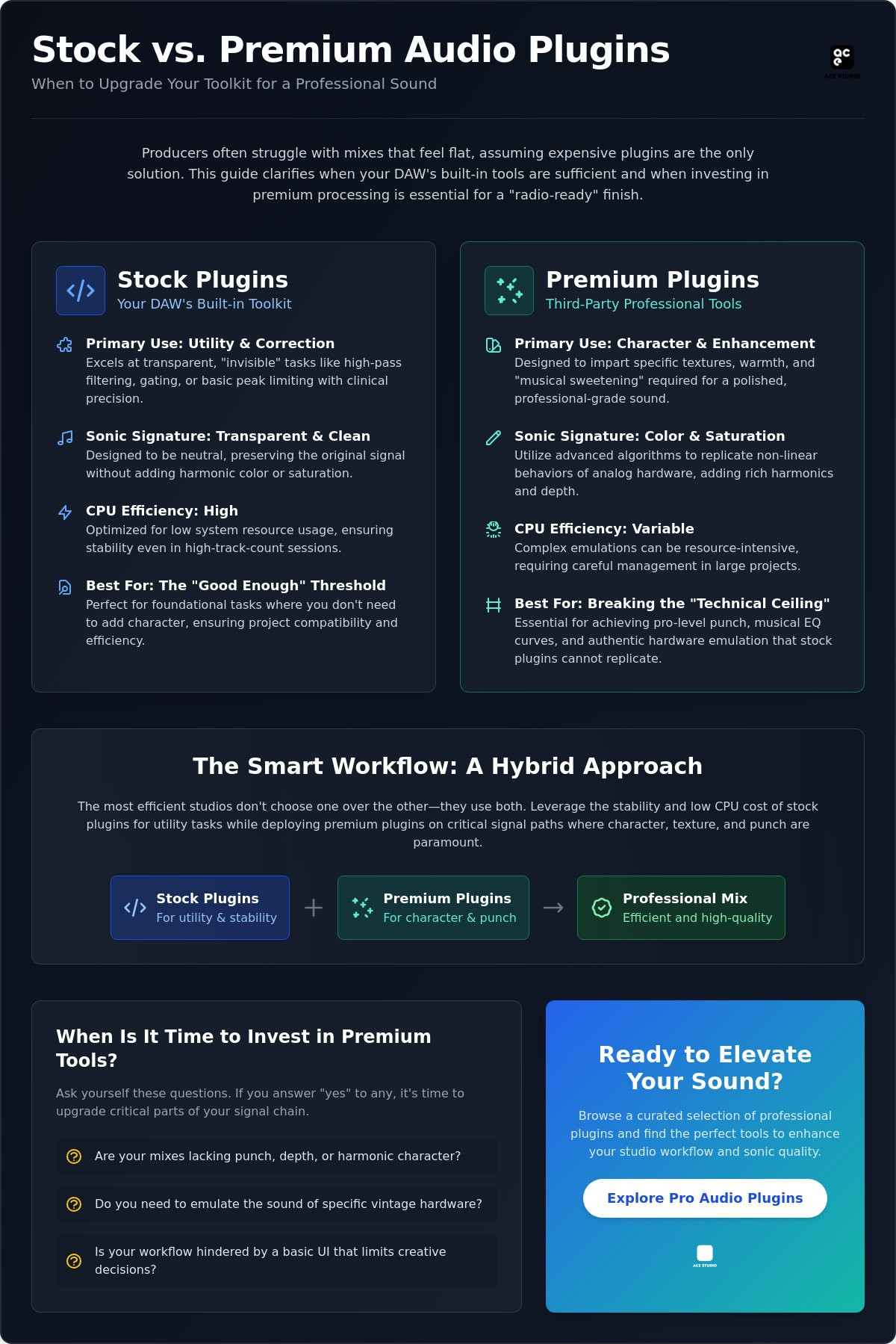
The “Good Enough” threshold is a technical reality in modern audio production. For many utility tasks, a standard stock plugin is more than sufficient. If you need a transparent high-pass filter or a basic gate to clean up a signal, the native tools in your DAW perform these functions with clinical precision. They are designed to be neutral and CPU-efficient. However, professional engineers often reach a technical ceiling when they require specific harmonic textures or complex non-linear behaviors that basic digital processors cannot replicate. While you can match the frequency response of two EQs, you cannot easily mimic the phase shifts and saturation characteristics of high-end hardware emulations with standard native code.
The psychological impact of the user interface also plays a significant role in creative output. Tools from developers like UVI or Sonnox provide visual feedback and ergonomic layouts that encourage faster, more intuitive decision-making. High-fidelity interfaces found in collections like Vintage Vault UVI do more than look professional; they present parameters in a way that aligns with established studio workflows. This helps bridge the gap between “the ear” and “the gear.” While the ear is the final judge, having access to superior DSP allows you to reach your sonic goals with fewer workarounds. If you are looking to refine your toolkit, you can browse professional processing options to see where your current setup might be lacking.
Utility vs. Character
Stock plugins excel at “invisible” tasks where transparency is the priority. Corrective EQ and basic peak limiting are standard strengths of native bundles. Problems arise when a track requires “vibe” or “weight.” Character-based tasks, such as vintage compression or tube saturation, often require premium alternatives for audio character. These third-party tools typically employ advanced oversampling and anti-aliasing techniques. This prevents digital harshness (aliasing) when pushing a signal into saturation, a common failure point for simpler stock processors.
Workflow and Efficiency
Efficiency in a professional environment is measured by how quickly you can achieve a result. Third-party bundles, such as the Sonnox Vocal Production Bundle, are designed to streamline complex signal chains into a few highly optimized modules. This reduces the need to stack multiple native plugins to achieve a single goal. While stock plugins are generally lightweight, stacking ten of them on every track can eventually tax your system more than one well-coded, high-efficiency third-party processor. Professional GUIs also prioritize high-speed adjustments, which is vital when working under tight delivery deadlines.
- Stock Strengths: Transparency, low CPU usage, session portability.
- Third-Party Strengths: Harmonic character, specialized DSP, workflow optimization.
The Technical Ceiling: Why Pro Engineers Invest in External Plugins
A standard stock plugin provides the essential math required for digital audio, but it often lacks the complex algorithmic precision needed for high-stakes professional delivery. Advanced algorithmic design separates basic native processors from premium tools. Developers like Sonnox invest heavily in proprietary DSP that maintains signal integrity through multiple stages of manipulation. This precision ensures that the audio remains clean and free from digital fatigue even after heavy processing. While native tools are reliable for foundation work, they rarely offer the specialized functionality required for surgical tasks like spectral editing or advanced audio restoration.
Inter-plugin communication is another area where third-party ecosystems outperform native bundles. Modern premium processors often feature “intelligent” workflows where different instances of a plugin talk to each other across the mix. This allows for automatic frequency masking detection or synchronized sidechaining across dozens of tracks. Managing these toolsets is also more flexible for the mobile professional. By using iLok or cloud-based digital licenses, you can carry your specific sonic signature between different studios and DAW platforms. This level of cross-platform portability is something a native stock plugin simply cannot provide.
Digital Signal Processing (DSP) Excellence
The technical distinction between linear phase processing in a native tool versus a premium alternative is found in the handling of pre-ringing and phase shift. High-end plugins manage artifacts and digital “harshness” by utilizing higher internal bit depths and more sophisticated filtering algorithms. Professional DSP minimizes rounding errors during complex calculations. This technical superiority is most evident in high-frequency processing, where inferior math often results in brittle or metallic textures that are difficult to correct later in the signal chain.
Network and System Integration
As session complexity increases, local CPU resources inevitably become a bottleneck. This is why tools like Vienna Ensemble Pro 8 are essential for offloading CPU load to secondary machines. In large-scale orchestral or film scoring templates, managing thousands of voices and complex effects requires network integration that standard DAW environments do not provide natively. Third-party software handles latency and buffer management across networked systems. This allows for stable, seamless playback in sessions that would otherwise exceed the capabilities of even the most optimized native processors.
- Algorithmic Precision: Higher internal bit depth reduces cumulative digital errors.
- Specialized Tools: Access to spectral editing and advanced restoration features.
- Resource Management: Ability to offload processing to external hardware or networked computers.
- Ecosystem Intelligence: Plugins that communicate across the session to solve masking issues automatically.
Direct Comparison: Stock EQ and Dynamics vs. Premium Alternatives
A standard stock plugin EQ is typically designed for surgical correction. If you need to notch out a specific resonance or apply a steep high-pass filter, the native processors in your DAW provide the necessary transparency. These tools are mathematically precise but often lack the “musical” curves associated with vintage hardware. Premium alternatives use specific phase shifts and non-linear frequency responses to provide sweetening. This adds a sense of “air” or “warmth” that a neutral stock tool is specifically programmed to avoid. For engineers, the choice is between fixing a problem and enhancing a performance.
The Dynamics Debate
Dynamics processing highlights the most significant gap between native and third-party tools. A Pro Tools Stock Compressor is excellent for basic leveling, but it often lacks sophisticated knee behavior. High-end hardware emulations feature program-dependent release times that react naturally to the audio signal. This creates the “glue” and “punch” required for professional drum busses and master chains. Stock limiters often struggle with transient preservation at high volumes. Reaching for a specialized third-party limiter ensures that your peaks remain sharp even when pushing for competitive loudness. You can explore professional dynamics processors to see how they handle complex signal peaks differently than your built-in toolkit.
Spatial and Orchestral Depth
The spatial limitations of a stock plugin are most apparent in algorithmic reverbs. Many built-in reverbs produce metallic artifacts or a “small” sound when pushed in a dense mix. Achieving realistic orchestral depth requires the sophisticated convolution technology found in the Eastwest Hollywood Orchestra Opus Edition. These tools use high-resolution samples of real acoustic spaces rather than mathematical approximations. Sample-based instruments require these specialized third-party players to manage articulations and room resonance with the precision needed for modern film scoring and production. This level of detail is simply outside the scope of standard DAW bundles.
Vocal processing further demonstrates this divide. While you can manually de-ess and compress a vocal using stock tools, the process is labor-intensive. The Sonnox Vocal Production Bundle utilizes intelligent DSP to identify and suppress sibilance and harshness automatically. This allows you to achieve a polished, radio-ready vocal sound in a fraction of the time. By offloading these complex tasks to specialized software, you maintain a more efficient workflow while ensuring a superior sonic result. This distinction becomes even more critical when managing high track counts where every micro-decision impacts the final mix clarity.
Optimizing Your Studio Workflow with Meershop’s Curated Plugins
Adopting a hybrid workflow is the most efficient path for professional engineers. You don’t need to abandon every stock plugin; instead, you should utilize them for non-critical tasks while reserving your CPU and budget for high-impact signal paths. This approach involves auditing your current library to identify the “weakest link.” If your vocal tracks lack presence or your orchestral arrangements sound two-dimensional, those are the specific areas where a third-party upgrade will yield the highest return on investment. Efficient studios use native tools for basic utility while deploying premium processors for character and technical precision.
Identifying where your built-in toolkit fails requires a methodical look at your final outputs. If you find yourself stacking multiple native compressors to achieve a “glue” that never quite materializes, your signal chain is inefficient. Upgrading that specific component reduces your track count and processing overhead. Professional results are often the product of a few high-quality decisions rather than dozens of corrective workarounds using limited native tools.
Strategic Upgrading for Professionals
Prioritizing your vocal and mastering chains offers the most significant improvement in mix quality. Tools like the Sonnox Vocal Production Bundle provide consistent, professional results by handling complex tasks such as de-essing and dynamic EQ with superior algorithmic clarity. Similarly, every professional facility requires at least one high-end orchestral or synthesizer library to meet modern production standards. While a stock plugin synth is useful for sound design, a comprehensive collection like Vintage Vault UVI provides the authentic harmonic depth required for commercial releases.
For engineers moving into live environments, future-proofing your toolkit is essential. The eMotion LV1 Classic offers a bridge between studio-quality processing and live sound stability. This allows you to bring your curated plugin library into a high-stakes performance environment without compromising on reliability or sonic integrity.
The Meershop Advantage
Purchasing through an authorized reseller ensures you receive legitimate digital licenses and expert technical support. Navigating the complexities of professional audio software licensing can be time-consuming; Meershop facilitates this process by providing clear documentation and direct access to industry-standard tools like Vienna Ensemble Pro 8 and Pro Tools Ultimate 1 Year Subscription. This expertise helps you build a stable workstation that remains compatible with global studio standards. You can access the latest software licenses and technical specifications through the Meershop shop to ensure your studio remains at the forefront of professional audio technology.
- Hybrid Efficiency: Use stock tools for utility and premium tools for character.
- Authorized Security: Ensure licensing clarity and long-term software support.
- Scalable Solutions: Transition from studio production to live sound with integrated hardware and software.
Refining Your Professional Audio Toolkit
Balancing the utility of a stock plugin with the specialized power of third-party processing is the hallmark of an efficient studio. You have seen how native tools provide a reliable foundation for corrective tasks while premium processors deliver the harmonic character and algorithmic precision required for commercial delivery. By identifying the specific technical ceilings in your current DAW setup, you can make strategic investments that yield the highest sonic return.
Meershop acts as a dedicated resource for these upgrades. As an authorized reseller for industry leaders like Sonnox and the Vienna Symphonic Library, we provide direct digital delivery of software licenses to ensure your workflow remains uninterrupted. Our team offers specialized support tailored to the technical requirements of professional audio engineers. Upgrade your studio with professional software licenses at Meershop to build a library that meets the demands of high-stakes production. Professional results are within reach when you have access to the right tools.
Frequently Asked Questions
What is the main difference between a stock plugin and a third-party plugin?
Stock plugins are native processors included with your DAW purchase, while third-party plugins are developed by external companies like Sonnox or UVI. Native tools prioritize transparency and stability within a specific workstation environment. Third-party options often focus on specialized DSP, harmonic character, or emulating vintage hardware that native tools cannot replicate. This distinction allows engineers to choose between utility and character depending on the project requirements.
Can I make a professional-sounding mix using only stock plugins?
You can achieve a professional mix using only native tools, as modern DAWs feature high-resolution DSP. However, a stock plugin often lacks the “sonic signature” and complex non-linear behaviors found in premium alternatives. Many engineers use stock tools for 80% of the mix and reserve third-party tools for critical signal paths like lead vocals or the master bus to add texture and depth.
Why do some third-party plugins cost hundreds of euros?
The cost of third-party plugins reflects the advanced algorithmic research and development required to create high-fidelity digital processors. Premium developers invest in specialized anti-aliasing techniques, higher internal bit depths, and meticulous hardware modeling. These features minimize digital artifacts and provide a level of musicality that basic native code cannot achieve. For high-stakes professional projects, this technical superiority justifies the higher price point compared to free alternatives.
Do third-party plugins use more CPU than stock plugins?
Third-party plugins often require more CPU resources because they utilize oversampling and complex mathematical calculations to improve audio quality. Stock plugins are optimized for low-latency performance and high track counts within their specific DAW environment. To manage heavy CPU loads from premium processors, professionals often use hosting solutions like Vienna Ensemble Pro 8 to offload processing to secondary systems, maintaining session stability during complex mixes.
Is it better to buy individual plugins or a bundle like Sonnox?
Bundles like the Sonnox Vocal Production Bundle typically offer a superior return on investment and a more cohesive workflow for engineers. Buying a bundle ensures that the user interface and signal processing logic remain consistent across your entire signal chain. Individual purchases are better suited for filling a specific “weakest link” in your library, such as a specialized convolution reverb or a unique wavetable synthesizer not found in standard bundles.
How do I manage licenses for third-party plugins if I change computers?
Professional third-party plugins use digital licensing platforms like iLok or cloud-based managers to handle transfers between workstations. These systems allow you to deactivate a license on one machine and activate it on another instantly. This portability is a significant advantage over a stock plugin, which is tied strictly to the specific DAW installation. It ensures that your specific sonic toolkit remains available regardless of the studio location.
What are the first stock plugins I should replace in my DAW?
You should prioritize replacing stock reverbs and character compressors first to see the most immediate improvement in your mixes. Built-in algorithmic reverbs often lack the depth and realism found in specialized sample-based libraries like the Eastwest Hollywood Orchestra Opus Edition. Similarly, native compressors are excellent for transparent leveling but rarely provide the harmonic “glue” and punch offered by premium hardware emulations used in professional mastering chains.
Are third-party plugins compatible with all versions of Pro Tools?
Compatibility depends on the plugin format and the specific version of Pro Tools you are currently running. Modern versions like Pro Tools Ultimate require the AAX format for native integration. While most developers provide AAX, VST, and AU versions, you must verify that the software supports your specific operating system and DAW version. Always review the manufacturer’s technical specifications and licensing requirements before purchasing a new digital license.
YOU MIGHT ALSO LIKE