Nederlands
Vienna Ensemble Pro Network Rendering: A Guide to Distributed Processing
The bottleneck in your orchestral template isn’t always your CPU’s clock speed, but how you manage the data stream between your workstation and your slave machines. When you implement Vienna Ensemble Pro netwerk rendering, you’re performing a protocol-level synchronization task rather than a simple audio stream. Many composers face the frustration of CPU spikes on their master machine or persistent latency and sync issues when offloading heavy processing. These technical hurdles can turn a high-end multi-computer setup into a source of instability rather than a tool for efficiency.
It’s a common challenge to distinguish between real-time performance and the requirements for offline rendering in a distributed environment. This guide will help you master the technical nuances of offloading audio processing to maximize your DAW’s performance. We’ll explore how to configure a stable processing environment that supports faster-than-real-time exports and handles massive libraries like the Eastwest Hollywood Orchestra Opus Edition without compromise. You’ll gain a clear understanding of network buffers, packet management, and the latest workflow optimizations in Vienna Ensemble Pro 8 to ensure your system remains reliable under heavy loads.
Key Takeaways
- Learn how buffer multiplier settings (1x, 2x, 3x) interact with your master DAW buffer to maintain stability during heavy processing.
- Differentiate between real-time recording and the efficiency of faster-than-real-time offline exports in a networked environment.
- Configure your hardware for optimal Vienna Ensemble Pro netwerk rendering by utilizing dedicated switches and Cat6 cabling to avoid data bottlenecks.
- Streamline the transition from a single-machine setup to a distributed rig capable of hosting massive libraries like the Eastwest Hollywood Orchestra Opus Edition.
- Implement Vienna Ensemble Pro 8 within a professional audio bundle to ensure seamless integration and long-term system reliability.
Understanding Vienna Ensemble Pro Network Rendering
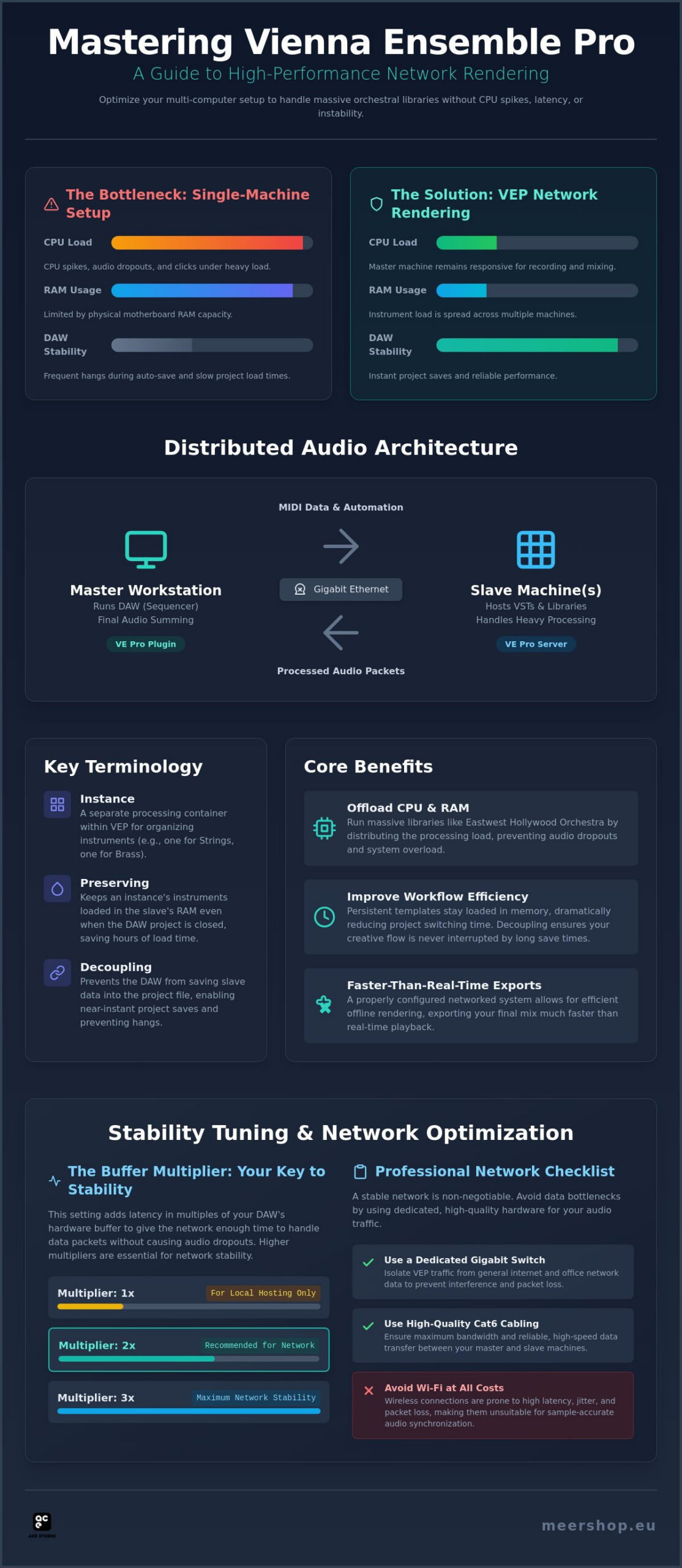
Vienna Ensemble Pro 8 functions as a cross-platform host that allows you to distribute your audio processing across multiple computers. In a standard studio environment, your primary workstation (the Master DAW) often struggles with the high CPU and RAM demands of modern virtual instruments. By utilizing Vienna Ensemble Pro netwerk rendering, you effectively turn secondary computers (Slaves) into external processing nodes. This system doesn’t rely on traditional audio cables or multiple hardware interfaces. Instead, it uses a proprietary protocol to transmit MIDI data from your DAW to the slave machine and return the processed audio packets back to your master mixer over a standard Gigabit Ethernet connection.
The Master DAW acts as the sequencer and final summing point. When you load the VE Pro plugin within your DAW, it creates a portal to a slave instance. The slave computer handles the heavy lifting of hosting plugins like the Eastwest Hollywood Orchestra Opus Edition, while your master machine remains responsive for recording and mixing tasks. This architecture eliminates the need for expensive external audio interfaces on every slave machine; the Ethernet cable handles all audio and MIDI traffic with sample-accurate synchronization. Since its development by the Vienna Symphonic Library, this method has become the professional standard for managing complex orchestral templates that exceed the capacity of any single workstation.
The Core Benefits for Large-Scale Templates
Offloading CPU-intensive virtual instruments to secondary hardware is the most immediate advantage. It prevents the audio dropouts and “clicks” that occur when a single processor reaches its limit. Furthermore, you can bypass the physical RAM limitations of a single motherboard by spreading your library load across several machines. A significant workflow benefit is the ability to maintain a persistent “preserved” template. Your instruments stay loaded in the slave’s memory even when you switch between different DAW projects, which saves hours of loading time during busy production days.
Key Terminology: Instances, Preserving, and Decoupling
To master Vienna Ensemble Pro netwerk rendering, you must understand how the software organizes data. An “Instance” is a separate processing container within the VE Pro server. You might have one instance for strings and another for brass. “Preserving” an instance keeps it active in the background when the DAW is closed. “Decoupling” is perhaps the most critical setting for stability; it prevents the DAW from trying to save the entire slave’s plugin data into your project file. This results in nearly instantaneous project saves and prevents the DAW from hanging during the auto-save process, which is essential for maintaining a professional rhythm in the studio.
The Technical Architecture of Distributed Audio Processing
The VE Pro plugin acts as a technical bridge between your DAW’s internal mixer and the network environment. Instead of hosting instruments directly on your master machine’s CPU, the plugin captures MIDI events and automation data, packaging them for transmission to the VE Pro Server. Once the slave machine processes this data, the audio is returned as high-bandwidth packets. This bi-directional communication requires precise timing to ensure that what you play on your keyboard aligns perfectly with what you hear in your monitors. The VSL proprietary protocol is the industry standard for MIDI-over-LAN as of 2026.
The buffer multiplier is the primary tool for managing Vienna Ensemble Pro netwerk rendering stability. This setting allows you to add specific amounts of latency to an instance in multiples of your DAW’s current hardware buffer. For example, if your master buffer is set to 256 samples, a 2x multiplier adds 512 samples of latency. This extra time allows the network to handle packet jitter and synchronization without causing audio dropouts. While a 0x or 1x setting is ideal for local hosting, a 2x or 3x multiplier is often necessary when offloading complex orchestral patches to a remote slave machine. If you are looking to scale your studio, you can find professional solutions like Vienna Ensemble Pro 8 to manage these complex routing tasks.
Sample Accuracy Across the Network
Maintaining sample-accurate timing is essential when blending networked instruments with local audio tracks. Every VE Pro instance reports its total latency, including the buffer multiplier, back to the DAW’s host. This allows the DAW to apply Automatic Delay Compensation (ADC) across the entire session. Even when using multi-output instances for complex routing, each audio return remains phase-locked. This ensures that when you perform a final render, every transient from your networked libraries aligns precisely with your project grid.
Audio and MIDI Data Stream Management
Efficient stream management is the difference between a stable template and a frustrating session. MIDI data is prioritized to ensure expressive performances aren’t compromised by network lag. However, the return audio stream is much heavier. A single instance of Vienna Ensemble Pro netwerk rendering can support up to 768 audio ports, which places a significant load on your network hardware. Because of this, wired Gigabit Ethernet connections are non-negotiable. Standard Wi-Fi protocols introduce too much packet jitter and unpredictable latency, which inevitably leads to synchronization failure during high-track-count exports.
Offline vs. Real-Time Rendering in a Networked Environment
Real-time rendering occurs when the DAW plays back the project at its standard tempo while you record the audio return from the slave machine onto a new track. This method is often used for “printing” stems manually to ensure every modulation and expressive detail is captured exactly as heard during the composition phase. Offline rendering, however, happens when the DAW initiates an export or “bounce to disk” process. In this mode, Vienna Ensemble Pro netwerk rendering allows the slave machine to process audio as fast as the network bandwidth and CPU permit. This often results in export speeds much faster than real-time, which is a significant advantage for tight deadlines.
Media composers using high-demand libraries like the Eastwest Hollywood Orchestra Opus Edition frequently encounter issues where “Render in Place” or offline bounces result in silence. This failure usually stems from a breakdown in communication between the master and slave. If the DAW begins the render before the slave machine has fully loaded the required samples into RAM, the resulting audio file will be truncated or empty. This is why understanding the underlying synchronization between your workstation and the network server is vital for a professional workflow.
The Master DAW Handshake Process
When you start an offline export, the master DAW sends a specific signal to the VE Pro server to switch from real-time playback to “offline mode.” This tells the slave to ignore the hardware buffer and process data at maximum velocity. To prevent silence or sync errors, you must enable the “Wait for all instances” setting in the VE Pro plugin. This setting forces the DAW to pause the export until every networked instance confirms it is ready to deliver the next block of audio. It’s the most effective way to troubleshoot host-sync issues during high-speed renders.
Best Practices for Stem Export
Efficient stem production requires routing multiple VST return tracks for simultaneous printing. Instead of bouncing one track at a time, use the multi-output capabilities discussed in previous sections to print entire orchestral sections in a single pass. You should also decide whether to host effects on the master or the slave. Keeping CPU-heavy reverbs on the slave machine reduces the processing load on your master DAW during the export. Finally, verify that your audio software license management is active on all machines. If a license check fails on a slave machine mid-render, the entire export will fail, requiring a full restart of the process.
Optimizing Your Network for Professional Rendering Performance
The physical infrastructure of your studio determines the reliability of Vienna Ensemble Pro netwerk rendering. Using standard Cat5e cables or relying on integrated ISP routers often leads to dropped packets and synchronization failures. You should implement Cat6 or Cat6a cabling to ensure sufficient bandwidth for high-track-count return streams. A dedicated Gigabit network switch is essential because standard consumer routers prioritize web traffic over the steady, low-latency data streams required for audio processing. This hardware isolation prevents office traffic or internet downloads from interrupting your audio buffer.
Configuring static IP addresses for your master and slave machines is a critical step for long-term stability. Relying on DHCP can cause the VE Pro plugin to lose track of its instances if an IP address changes after a system reboot. You should also disable “Energy Efficient Ethernet” (EEE) or “Green Ethernet” settings in your network adapter properties. These features attempt to save power by putting the network port into a low-power state during periods of low activity. In a professional audio environment, this causes immediate CPU spikes and latency when audio processing resumes after a silent passage.
Network Switch Selection for Audio
For most small to medium setups, a high-quality unmanaged switch is sufficient. It provides a “plug-and-play” environment without the complexity of VLAN configuration. Managed switches are only necessary if you need to monitor specific port traffic or implement Quality of Service (QoS) rules. Enabling Jumbo Frames (typically 9000 MTU) can improve efficiency by allowing larger data packets, but every device on the network must support this setting to avoid communication errors. A dedicated LAN, physically separated from your internet connection, remains the most reliable way to prevent bandwidth competition.
Optimizing the Slave OS for Rendering
The slave machine must be optimized to prioritize background processing over user interface tasks. Disable all automatic background updates and unnecessary services that might trigger CPU interrupts during a render. On Windows slaves, set the power plan to “High Performance” to prevent the processor from down-clocking during lighter passages. Within the VE Pro server settings, allocate CPU threads based on the complexity of your instruments. Generally, it’s more efficient to use more instances with fewer threads per instance than a single instance with many threads. If you need to expand your networked processing power, you can buy Vienna Ensemble Pro 8 to establish a professional distributed environment.
Implementing Vienna Ensemble Pro 8 in Your Production Workflow
Transitioning from a single-machine setup to a networked rig requires a methodical approach to signal routing and file management. Instead of hosting every virtual instrument within your DAW’s local memory, you begin building instances on a dedicated slave machine. This shift allows you to utilize professional audio bundles Netherlands to create a cohesive ecosystem where your primary workstation remains lean and responsive. By offloading these tasks, you ensure that Vienna Ensemble Pro netwerk rendering remains stable even as your track counts grow into the hundreds. It’s a fundamental change that moves the processing load away from your creative environment.
Vienna Ensemble Pro 8 introduces several features designed to streamline the rendering process. Group Edit allows you to synchronize settings across multiple instances simultaneously, which is a significant time-saver for template maintenance. Channel Sets enable the rapid creation of templates by saving and loading entire channel configurations across different instances. Additionally, Plug-in Pooling optimizes resource sharing to reduce load times. These tools are designed to minimize technical friction, ensuring your system is always prepared for a high-speed offline export without the risk of synchronization failure. For a broader perspective on building a stable plugin ecosystem around these tools, the guide to professional DAW plugins for a high-performance studio ecosystem offers a methodical framework for integrating Vienna Ensemble Pro 8 alongside other industry-standard assets.
Before initiating a final render, follow this stability checklist:
- Static IP addresses are configured for all master and slave machines.
- Cat6 cabling is used with a dedicated Gigabit switch.
- Decoupling is enabled for all instances to prevent slow DAW project saves.
- The “Wait for all instances” option is selected in the VE Pro plugin settings.
- All iLok licenses are verified and active on the networked computers.
Scaling Your System with Meershop
Meershop acts as an expert facilitator for professionals scaling their production environments. Acquiring software through a reliable partner ensures you receive technical precision in license delivery and administrative clarity. Whether you are adding additional licenses for new slaves or upgrading your current rig, Meershop provides the necessary infrastructure to support Vienna Ensemble Pro 8. Professional engineers choose this methodical approach to software acquisition to avoid the logistical hurdles often found in consumer-level retail environments. For those who want to understand the full scope of VSL licensing options and iLok Cloud compatibility, the comprehensive guide from a trusted Vienna Symphonic Library reseller covers the essential 2026 updates and hardware requirements for integrating the latest Synchron Series libraries into your distributed workflow.
The Logical Conclusion: A Distributed Future
The shift from hardware-bound processing to network-distributed audio is a permanent change in the professional industry. As sample libraries become more detailed and track counts increase, Vienna Ensemble Pro netwerk rendering remains the foundation of the modern studio. Preparing your infrastructure today ensures you can handle the demands of tomorrow’s immersive audio formats and massive orchestral templates. Optimizing your studio is not just about raw power; it’s about creating a reliable, transparent environment where the technology stays in the background, allowing you to focus on the production itself.
Optimizing Your Distributed Production Environment
Mastering distributed audio processing requires more than just high-end hardware; it demands a precise understanding of network protocols and software synchronization. By correctly managing buffer multipliers and implementing a dedicated physical network infrastructure, you ensure that your system remains stable under the heaviest orchestral loads. Utilizing features such as decoupling and the “Wait for all instances” setting prevents the common failures associated with networked exports, allowing you to focus on the creative process rather than technical troubleshooting.
Implementing a robust Vienna Ensemble Pro netwerk rendering workflow allows you to scale your production capabilities without the physical constraints of a single workstation. As an Authorized Vienna Symphonic Library Reseller, Meershop provides specialized technical support for professional engineers and instant digital license delivery to keep your studio running efficiently. Upgrade your studio efficiency with Vienna Ensemble Pro 8 from Meershop and establish a reliable, high-performance distributed environment today. Your studio is now ready to handle the most demanding modern sample libraries with confidence.
Frequently Asked Questions
Does Vienna Ensemble Pro 8 support offline rendering in all DAWs?
Yes, Vienna Ensemble Pro 8 supports offline rendering in most professional DAWs that utilize VST, AU, or AAX plugin formats. The software communicates the export state to the slave server, allowing it to process audio faster than real-time. It’s essential that your host DAW correctly implements the offline processing flag so the networked instances know to switch from real-time playback to high-speed rendering mode during an export or bounce.
Can I use a Wi-Fi connection for VE Pro network rendering?
No, you shouldn’t use a Wi-Fi connection for Vienna Ensemble Pro netwerk rendering due to unpredictable packet jitter and latency. Professional audio distribution requires the stable, high-bandwidth environment provided by Gigabit Ethernet and Cat6 cabling. Wi-Fi protocols are prone to interference and dropouts, which will cause synchronization failures and audio artifacts during the rendering process, especially when hosting large orchestral libraries that require steady data streams.
What is the ideal buffer multiplier for a networked slave machine?
The ideal buffer multiplier for a networked slave machine is typically 2x the master DAW buffer. This setting provides a reliable balance between performance and latency by allowing the network extra time to handle data packets. While a 1x multiplier works for local instances, remote slaves often require 2x or 3x to prevent dropouts during complex passages. Always adjust this based on your specific network stability and the track count of your project.
Why is my “Render in Place” outputting silence when using VE Pro?
Silence during “Render in Place” usually indicates that the DAW started the export before the slave machine was ready or the samples weren’t fully loaded into RAM. To fix this, enable the “Wait for all instances” setting within the VE Pro plugin properties. This forces the master DAW to pause the render until every networked instance confirms it has processed the necessary audio data, ensuring no truncated files or silent passages occur.
Do I need a separate audio interface for every slave computer?
No, you don’t need a separate audio interface for your slave computers. All audio and MIDI data are transmitted through the Ethernet cable directly to the master workstation. The slave machine processes the virtual instruments and sends the digital audio packets back to your primary DAW’s mixer. This architecture reduces hardware costs and simplifies your studio setup by centralizing all audio monitoring and final output through your master machine’s primary interface.
How many computers can I connect using a single VE Pro license?
One Vienna Ensemble Pro 8 license is required for every computer that runs the VE Pro Server software. If you have one master workstation and two slave machines, you’ll need three licenses in total to run the full networked rig. Each license allows you to run an unlimited number of instances and plugins on that specific machine, provided the hardware resources like CPU and RAM can handle the processing load.
Does network rendering affect the final audio quality of my mix?
No, Vienna Ensemble Pro netwerk rendering does not degrade the final audio quality of your mix. The system transmits bit-perfect digital audio data over the network protocol. As long as your network infrastructure is stable and you don’t experience dropouts or synchronization errors, the audio returned from the slave is identical to what would be produced if the plugin were hosted locally on your master machine’s internal drive.
YOU MIGHT ALSO LIKE