Nederlands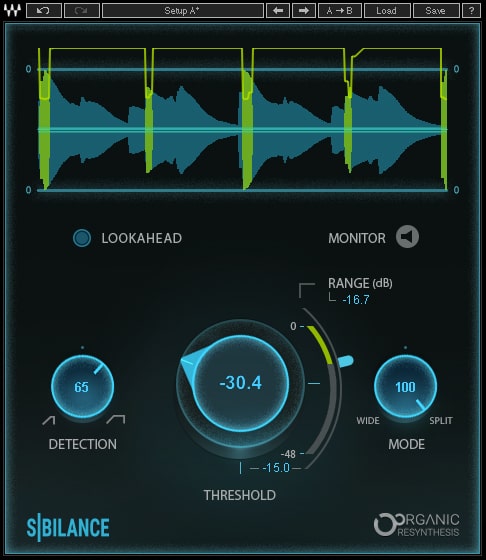

Sibilance
Description
Waves
Sibilance
Powered by Waves’ innovative Organic ReSynthesis technology, this transparent vocal de-esser removes harsh vocal ‘s’ sounds faster than ever before, with exceptional quality – allowing you to make your vocals brighter without harshness.
Thanks to its Organic ReSynthesis engine, Sibilance allows precise identification of unwanted sibilant sounds such as ‘s’ and ‘sh’, resulting in smooth, glitch-free, effective de-essing which maintains the timbre, duration, and natural resonance of the original vocal sound.
Unlike most de-essers which act like narrow-band compressors, Sibilance uses Organic ReSynthesis spectral filters to identify undesirable bursts of sibilant energy, then completely separates the nuances of sibilance from the vocal signal, leaving the rest of the signal untouched.
Once applied, Sibilance’s unique method of separating sibilant parts from the raw vocal signal allows for otherwise extreme processing on the vocal track, such as aggressive EQing to drastically brighten a vocal.
With simple yet powerful controls, Sibilance takes only seconds to set up: Insert it on a vocal or voiceover track, and simply set the threshold and range controls to dial in the perfect amount of ‘s’ reduction.
Whether tracking or mixing, on vocals or voiceovers – get an ideal vocal sound fast, reliably and effortlessly.
Clever, fast, powerful de-esser specifically designed for vocals and voiceovers
Smooth, glitch-free removal of harsh ‘s’ sounds like never before
Separates the sibilant parts of the vocal without changing the vocal’s original tone
Easy-to-use threshold and sensitivity controls
Innovative sibilance detector powered by Waves’ Organic ReSynthesis technology
Sibilance detection graph to help you visualize the amount of ‘s’ reduction
Variable range modes: from wide to split-band processing
Brand
Waves
You want more information?
Call or mail a specialist
Phone: +31 514 523117 Mail: jan@meershop.eu

Extra Information
Sibilance (V10) – System Requirements
Mac
CPU
Intel Core i5 / i7 / Xeon
Memory
8 GB RAM
8 GB free disk space on the system drive
Operating System
10.11.6 – 10.14
Screen Resolution
Minimum: 1024×768
Recommended: 1280×1024 / 1600×1024
USB displays are not supported as the primary display.
Support for Visually Impaired Users
Mac OS Sierra 10.12.4
VoiceOver Utility enabled
Pro Tools 12.7
Logic 10.3.1
Please note: Waves Central and preset management via the WaveSystem Toolbar are currently not supported.
Windows
CPU
Intel Core i3 / i5 / i7 / Xeon / AMD Quad-Core
Memory
8 GB RAM
8 GB free disk space on the system drive
Operating System
Windows 7 with SP1 64 bit
Windows 8.1 64 bit
Windows 10 64 bit
Screen Resolution
Minimum: 1024×768
Recommended: 1280×1024 / 1600×1024
Related products