Nederlands
What are VST Plugins? The Professional Guide to Virtual Studio Technology in 2026
The modular architecture of your digital studio is only as reliable as the code running within it. In 2026, vst plugins are no longer just optional add-ons; they are the fundamental building blocks of a professional signal chain. It’s frustrating when a high-stakes session grinds to a halt because of a VST3 compatibility error or a sudden CPU spike that your hardware should theoretically handle. You’ve likely spent more time managing iLok activations or troubleshooting the differences between AAX and VST3 formats than actually finishing a mix.
This guide clarifies the technical landscape so you can stop guessing and start optimizing your production environment. You’ll master the technical foundations of the current VST3.8.0 standard, including the shift toward open-source licensing that is currently reshaping the industry. We also address the logistical side of studio management, from evaluating high-end software to implementing stable licensing workflows across multiple machines. By the end of this article, you’ll have a clear framework for building a digital signal chain that is both powerful and reliable.
Key Takeaways
- Define the role of Virtual Studio Technology as the software interface standard that enables a modular and scalable digital production environment.
- Differentiate between VST3, AU, and AAX formats to ensure cross-platform compatibility and long-term stability for all installed vst plugins.
- Categorize your toolkit into virtual instruments (VSTi) and audio effects (VSTfx) to optimize signal routing and processing logic within your DAW.
- Master professional license management and folder organization to mitigate CPU overload and prevent host application crashes during high-stakes sessions.
- Identify the technical criteria for when to transition from stock DAW tools to elite-tier third-party processing for specialized production tasks.
Understanding VST Plugins: The Architecture of Modern Music Production
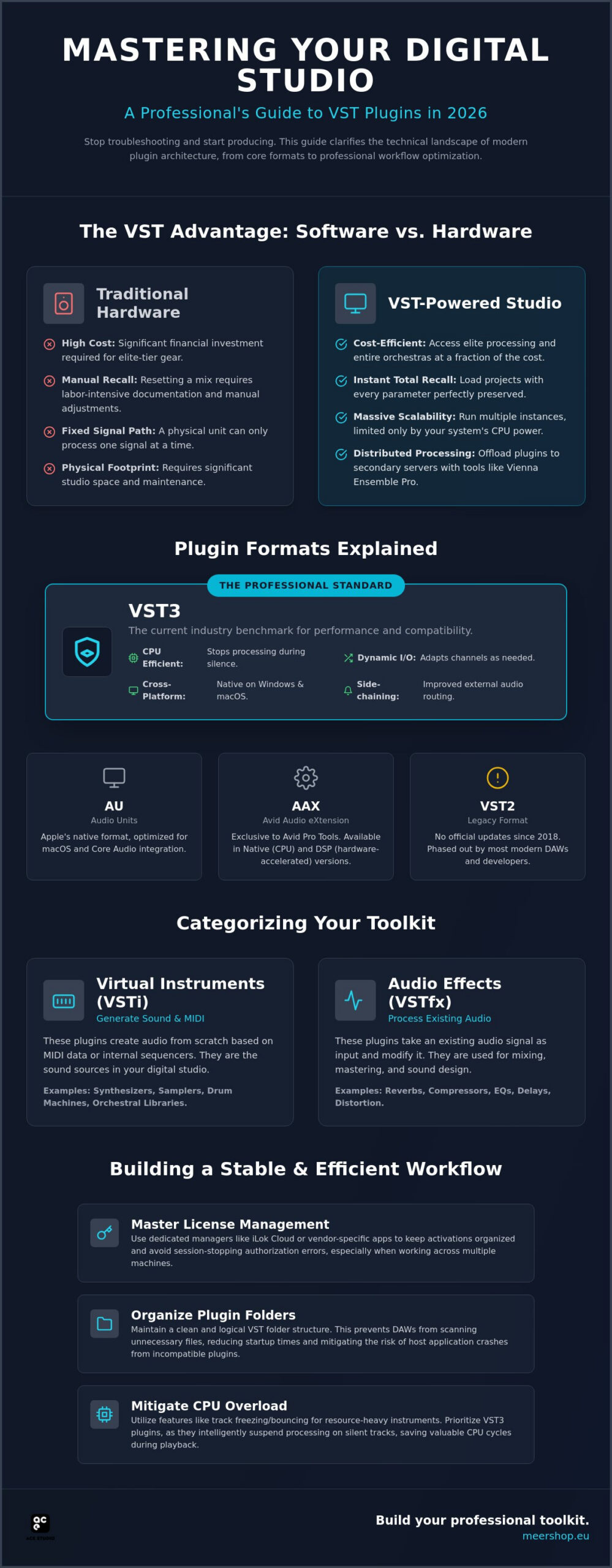
The architecture of modern music production relies on a standardized protocol that allows different software components to communicate seamlessly. Virtual Studio Technology (VST) is the industry-standard interface that makes this possible. It enables a host application, such as Pro Tools Ultimate or the eMotion LV1 Classic, to integrate third-party software synthesizers and effect processors into a single environment. Developed by Steinberg in 1996, this protocol fundamentally changed the industry by replacing the need for massive physical hardware racks with digital code. It operates via a host-client relationship. The DAW acts as the host, providing the audio buffer, timing clock, and power management. The vst plugins act as clients, processing the audio or MIDI data they receive before returning it to the host’s mixer. In 2026, this standard remains the benchmark because it provides a universal language for developers and users alike.
The Evolution of the Digital Studio
The transition from physical hardware to digital emulations represents a fundamental democratization of high-end audio processing. Historically, access to elite-tier compressors or full orchestral ensembles was restricted by the physical footprint and high cost of analog gear. The VST standard allowed developers to replicate complex analog circuitry and acoustic environments within a digital framework. This shift enabled third-party developers to push sonic boundaries beyond physical limitations. Professionals now utilize tools like the Eastwest Hollywood Orchestra Opus Edition to access world-class scoring stages from a desktop. This accessibility has shifted the focus from equipment acquisition to technical application and creative execution.
Software vs. Hardware: The VST Advantage
For professional engineers, the primary advantage of software is total recall. In a hardware-based studio, resetting a mix to a previous state requires manual documentation and significant labor. VST technology allows for instantaneous project loading with every parameter preserved. This efficiency is a logistical necessity in modern fast-paced production cycles. It ensures that revisions can be made accurately without the risk of human error in resetting physical knobs.
Scalability and cost-efficiency are equally critical. A physical synthesizer can only process one signal path. A virtual equivalent, like those in the UVI Vintage Vault, can be instantiated multiple times across a mix. You are only limited by your system’s processing power. Specialized utilities such as Vienna Ensemble Pro 8 allow you to host these plugins on secondary servers. This creates a distributed signal chain that hardware setups cannot match without massive financial investment. The ability to run dozens of instances of a high-end processor like the Sonnox Vocal Production Bundle across a single session provides a level of control that was previously impossible.
VST Formats and Compatibility: VST2, VST3, AU, and AAX Explained
Professional workflows depend on selecting the correct software format for specific host environments. While all vst plugins perform similar functions, the underlying code varies between VST3, AU, and AAX. VST2 is now considered a legacy format; it has not received official updates since 2018. In contrast, VST3 is the current industry standard. It offers superior performance and integration. For macOS users, Audio Units (AU) provide a system-level standard optimized for Apple’s Core Audio. Meanwhile, Avid’s Pro Tools Ultimate 1 Year Subscription relies exclusively on the AAX (Avid Audio Extension) format. AAX was designed specifically to handle the high track counts and DSP requirements of the Avid ecosystem. It exists in two versions: AAX Native and AAX DSP, with the latter offloading processing to dedicated hardware. Ensuring cross-platform compatibility is vital if you move sessions between Windows and Mac systems. Standardizing on VST3 whenever possible simplifies this process.
Why VST3 is the Professional Standard in 2026
The release of the VST3 SDK version 3.8.0 in October 2025 solidified its dominance. One major advantage is improved CPU efficiency. VST3 plugins automatically stop processing when no audio signal is present. This prevents unnecessary resource drain during silent passages in a mix. Dynamic I/O is another key feature. It allows a single plugin instance to adapt to different bus configurations, such as switching from mono to surround sound without requiring separate plugin versions. Additionally, VST3 supports sample-accurate automation. This ensures that parameter changes occur exactly where they are drawn on the timeline. It avoids the timing jitter common in older formats, which is essential for complex electronic arrangements and precise vocal processing.
Choosing the Right Format for Your DAW
System stability requires a disciplined approach to plugin installation. You don’t need to install every available format provided by an installer. If you use Pro Tools, focus on AAX. For Logic Pro, AU is preferred because it is deeply integrated into the macOS kernel, resulting in lower latency and better stability for Mac-exclusive producers. However, VST3 remains the most versatile for multi-DAW setups. If you need to run legacy software or bridge different formats, tools like Vienna Ensemble Pro 8 provide a robust hosting environment. This is especially critical when using professional live audio mixing software. In high-pressure live environments, like those powered by the eMotion LV1 Classic, format stability is non-negotiable. Using the wrong wrapper or an unstable bridge can lead to system-wide failure. It’s better to maintain a lean, standardized library than to risk a crash during a performance.
Categorizing the Toolkit: Virtual Instruments vs. Audio Effects
The ecosystem of vst plugins is broadly divided into functional categories based on their role in the signal chain. At the most fundamental level, we distinguish between Virtual Instruments (VSTi) and Audio Effects (VSTfx). VSTi components act as generators; they receive MIDI data and translate it into an audio signal. Conversely, VSTfx components are processors that receive an existing audio stream, manipulate it through mathematical algorithms, and output the modified sound. Beyond these primary types, the 2026 landscape includes dedicated MIDI plugins that generate complex patterns or harmonies without producing sound themselves. Professional engineers also rely on utility plugins, such as spectrum analyzers and loudness meters, to maintain technical standards throughout the production process.
Virtual Instruments: From Synthesis to Sampling
Modern VSTi engines vary from subtractive and wavetable synthesis to massive sample-based libraries. Collections like the Vintage Vault UVI provide digital emulations of classic hardware engines. For those requiring hyper-realistic acoustic textures, accessing professional sound libraries is essential. Tools like the Eastwest Hollywood Orchestra Opus Edition or the Saecula Organ Collection utilize high-resolution sampling to replicate complex orchestral and pipe organ performances. Hybrid instruments now combine these approaches. They layer synthetic oscillators with organic recordings to create unique sonic signatures that don’t exist in the physical world.
Audio Effects: The Signal Processing Chain
Once a signal is generated, it must be refined through a deliberate processing chain. Dynamics processing is the first priority for most engineers. Professional compressors and limiters, such as those in the Sonnox Vocal Production Bundle, are required to control transients and ensure vocal clarity. Spatial effects like algorithmic reverbs and delays define the depth of a mix. They place sounds within a virtual three-dimensional environment. Finally, spectral processing through EQ and saturation allows for precise tonal balancing. This ensures that every element of the mix occupies its own frequency space without clashing. Using high-quality mixing plugins voor professionals for these tasks prevents the phase issues and digital artifacts often found in lower-tier software. It’s the difference between a cluttered bedroom production and a commercially viable master.
The Professional Workflow: Licensing, Management, and CPU Efficiency
Managing a professional studio requires more than sonic expertise. It demands rigorous administrative discipline. The proliferation of vst plugins across dozens of manufacturers often leads to licensing fragmentation. Centralizing this process is essential for studio security and uptime. Most high-end developers utilize PACE iLok or Steinberg’s licensing systems. As of May 2025, iLok expanded its capabilities to include rent-to-own models through its Shopify integration. This allows professionals to manage perpetual licenses and installments in one location. You must choose between machine-based activation and cloud-based licensing. Machine-based activation is the safer choice for mission-critical workstations. It ensures your tools remain available even if the studio’s internet connection fails. Cloud licensing is convenient for mobile setups but introduces a point of failure that can disrupt high-stakes sessions.
Folder management is the next pillar of a stable workflow. Plugin bloat occurs when you install every available format (VST2, VST3, AU, AAX) for every purchase. This clutters your search menus and increases the risk of host crashes. Standardize your library by manufacturer and functional type. This methodical organization allows for faster access during creative moments. It also simplifies the troubleshooting process when a specific component causes instability. For those looking to optimize their setup, you can acquire professional licenses and management tools to streamline your digital environment.
Maintaining Studio Stability
Regular updates are mandatory for maintaining version compatibility. However, you shouldn’t update blindly in the middle of a project. Test new versions on a non-critical machine first. If your DAW becomes unstable, you need to identify the rogue plugin quickly. Most modern DAWs provide a crash log that points to the specific file. If not, use a binary search method. Move half of your plugins to a temporary folder and relaunch the host. This process of elimination is the fastest way to restore stability. It’s also vital to monitor recent software changes. For example, the Native Access update in early 2026 introduced a “Discover” tab that helps track new instruments and updates more efficiently.
Network Rendering and Efficiency
Large-scale productions often exceed the processing power of a single CPU. Offloading these tasks to a secondary computer is a standard professional solution. Vienna Ensemble Pro 8 acts as a dedicated VST server, allowing you to run resource-heavy libraries on a separate machine via a simple LAN connection. This preserves your primary workstation’s resources for recording and real-time mixing. It also helps balance buffer size and latency. In a plugin-heavy session, you can keep your buffer low for recording while the secondary server handles the heavy lifting of orchestral samples or complex synthesizers. This distributed architecture is the hallmark of a professional-grade digital signal chain.
Moving Beyond Stock: When to Invest in Professional VST Bundles
Every modern DAW includes a suite of functional tools, yet the stock plugin vs. third-party debate remains central to professional studio growth. Stock plugins are designed for broad accessibility; they are CPU-light and cover basic needs. However, third-party vst plugins offer specialized utility that general-purpose tools cannot replicate. High-end developers invest years into mathematical modeling to capture the specific “sonic signature” of vintage hardware. This includes the non-linear harmonics and phase relationships that give analog gear its character. When you invest in professional bundles, you are paying for that research and the long-term value of consistent updates and industry-standard compatibility. Elite-tier software ensures your sessions remain open and functional as operating systems evolve, providing a level of reliability that free or entry-level tools often lack.
The Elite Tier: Sonnox and Professional Vocal Processing
Achieving radio-ready vocals requires more than simple equalization. Specialized algorithms are necessary to handle the complex dynamics of the human voice without introducing digital artifacts. The Sonnox Vocal Production Bundle represents this elite tier of processing. Unlike stock de-essers or compressors that can sound “choked” under heavy gain reduction, Sonnox tools prioritize transparency. This allows you to apply aggressive processing while maintaining a natural, open sound. Professional mixing requires this level of precision. Using general-purpose stock plugins for critical vocal chains often leads to a “small” or “brittle” mix that lacks the depth found in commercial masters. Specialized tools solve these specific problems efficiently, saving you time during the final mixdown.
Building a Comprehensive Library
A professional library should be curated with a focus on quality over sheer quantity. Start with essentials: a high-resolution EQ, a versatile compressor, and a convolution reverb. Once your foundation is stable, invest in tools that provide creative inspiration. A massive collection like the Vintage Vault UVI offers a diverse palette of historical synthesizers that can spark new ideas instantly. It’s about having the right tool for a specific frequency or texture. However, you must avoid the trap of “buying everything.” Focus on developers that offer robust support and clear licensing paths. Whether you are using the Eastwest Hollywood Orchestra Opus Edition for scoring or the Saecula Organ Collection for traditional arrangements, each addition should serve a specific technical or creative purpose. A lean, high-quality library is always more productive than a bloated folder of mediocre tools.
Refining Your Digital Signal Chain for Professional Results
Standardizing your studio architecture requires a shift from collection to curation. You’ve seen how focusing on VST3 and AAX formats ensures cross-platform stability and long-term project recall. Managing your vst plugins through a centralized, machine-based licensing workflow isn’t just an administrative task; it’s a requirement for maintaining an uninterrupted professional signal chain. By selecting specialized tools for critical tasks like vocal production or orchestral layering, you’ll ensure your output meets commercial standards for transparency and depth.
Meershop serves as a reliable partner in this technical evolution. We are an authorized reseller for industry leaders including Sonnox and the Vienna Symphonic Library. Our team provides direct delivery of digital software licenses alongside expert technical support for complex registration and activation processes. We understand the nuances of professional workflows and prioritize the efficiency of every transaction.
Refine your studio today. Browse our curated selection of professional VST plugins and virtual instruments to optimize your production environment. Establishing a stable, elite-tier toolkit is the most direct path to professional results in 2026.
Frequently Asked Questions
What is the difference between VST and VST3?
VST3 is the current architectural standard, replacing the discontinued VST2 format. It introduces significant technical improvements, such as suspending processing when no signal is present to save CPU resources. VST3 also supports dynamic I/O and sample-accurate automation. While VST2 is still found in legacy setups, it hasn’t received official updates since 2018. Transitioning to VST3 ensures better stability and performance in modern digital audio workstations.
Can I use VST plugins in Pro Tools?
Pro Tools does not natively support vst plugins; it utilizes the AAX format exclusively. If you need to run VST software within Pro Tools, you must utilize a third-party hosting solution. Tools like Vienna Ensemble Pro 8 act as a bridge, allowing you to host VST instruments and effects outside the DAW and route the audio back into your Pro Tools session. This is a common professional workaround for maintaining format compatibility.
Do VST plugins work on both Mac and Windows?
Most professional developers provide installers for both macOS and Windows. However, a plugin is not a universal file; you must install the specific binary designed for your operating system. Windows typically uses .vst3 or legacy .dll files, while Mac utilizes .vst3 or .component (AU) formats. Always verify that the developer supports your specific OS version and processor architecture, such as Apple Silicon or Intel, before finalizing a license purchase.
Why are some VST plugins so expensive compared to others?
High-end pricing reflects the specialized research required to model complex analog hardware or high-resolution acoustic environments. Elite tools involve mathematical modeling that captures non-linear harmonics and phase relationships. This development cycle is costly and time-intensive. Additionally, professional pricing includes long-term technical support and compatibility updates for evolving operating systems. Bundles like the Sonnox Vocal Production Bundle provide a level of transparency and reliability that budget software typically cannot achieve.
How do I install VST plugins so my DAW can find them?
Install your plugins using the official executable provided by the manufacturer to ensure files are placed in the correct system directories. On Windows, the standard path for VST3 is C:Program FilesCommon FilesVST3. Mac users will find their plugins in /Library/Audio/Plug-Ins/VST3. Once installed, launch your DAW and check the plugin manager settings to ensure these directories are included in the scan path. Most modern hosts detect new installations automatically.
Will too many VST plugins slow down my computer?
Every active instance of vst plugins places a specific demand on your CPU and system memory. While VST3 is more efficient than older formats, running dozens of complex synthesizers or oversampled effects will eventually lead to audio dropouts and latency issues. To maintain performance, you can “freeze” or “commit” tracks to audio once processing is complete. This renders the plugin’s output and disables the live software to free up resources. For a detailed breakdown of which processors deliver the best performance-to-quality ratio, see our technical review of the best mixing plugins voor professionals in 2026.
What is an iLok and do I need one for my VSTs?
iLok is a centralized license management platform used by many professional software manufacturers to authorize their products. You’ll need a free iLok account to manage your activations. Depending on the developer, you can choose between machine-based activation, iLok Cloud, or a physical iLok USB dongle. Most studio professionals prefer machine-based or USB activation because these methods don’t require a persistent internet connection to keep your plugins functional during a session.
Are free VST plugins safe to use in a professional session?
Safety depends on the developer, but free plugins often lack the rigorous testing and professional support required for high-stakes sessions. While many are technically safe, they can cause host instability or project recall issues if the developer stops providing updates. In a professional environment, a single unstable component can disrupt an entire session. It’s generally safer to utilize supported, commercial software that offers guaranteed compatibility and regular maintenance to ensure your studio remains stable.
YOU MIGHT ALSO LIKE