Nederlands
Managing Live Audio Latency: The Professional Engineer’s Guide to Zero-Latency Performance
A 10-millisecond delay might be the industry’s “acceptable” threshold, but for a professional vocalist on in-ear monitors, it’s a career-ending distraction. When a performer complains about an echo or “phasing” in their ears, they aren’t being difficult; they’re reacting to the physical limitations of your digital signal chain. Effectively managing live audio latency requires moving beyond simple buffer adjustments and addressing the architecture of your entire network.
You know the frustration of chasing stability while trying to keep round-trip latency under 5ms during a four-hour show. Lowering your buffer size often leads to CPU spikes or system crashes just when the set hits its peak. This guide provides the technical strategies and hardware configurations needed to eliminate these bottlenecks. We’ll examine driver optimization for the latest 2026 releases, DSP offloading with tools like the eMotion LV1 Classic, and how to utilize the Sonnox Vocal Production Bundle for zero-latency processing. By the end of this article, you’ll have a clear roadmap for achieving stable, sub-5ms performance in any professional live sound environment.
Key Takeaways
- Understand the psychoacoustic thresholds of different performers to set realistic targets for managing live audio latency in professional environments.
- Learn how to use loopback tests to measure real-world Round-Trip Latency and identify specific plugins that introduce look-ahead delay.
- Configure ASIO and Core Audio drivers correctly and leverage higher sample rates to mathematically reduce latency at the hardware level.
- Implement DSP-offloading solutions like Waves SoundGrid and the eMotion LV1 Classic to remove the processing burden from your host CPU.
- Design streamlined session templates and monitoring workflows that prioritize stability during demanding four-hour live performances.
The Fundamentals of Live Audio Latency: Why Milliseconds Matter
Audio latency is the measurable time elapsed between an acoustic sound wave entering a microphone and the processed signal exiting a loudspeaker. In any digital system, this delay is an unavoidable byproduct of data processing. For the professional engineer, managing live audio latency isn’t about achieving a theoretical zero; it’s about reducing the delay until it falls below the “Psychoacoustic Threshold” where the human brain can no longer distinguish it from real-time sound.
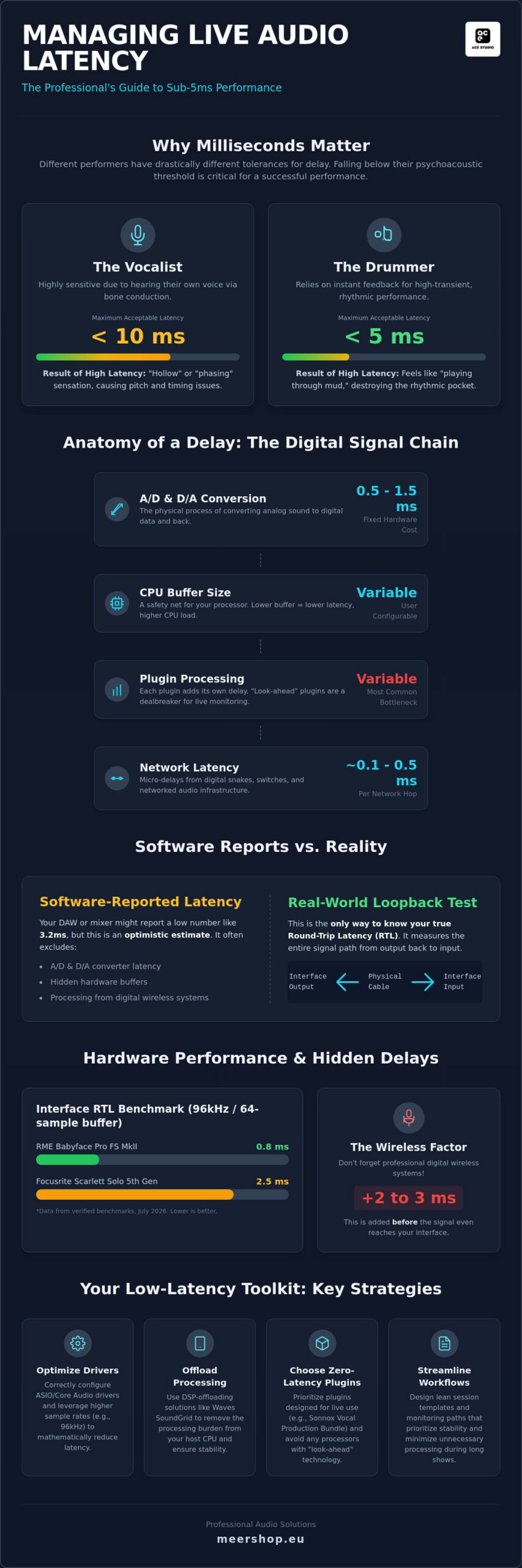
Perception varies significantly based on the performer’s instrument. Vocalists are highly sensitive because they hear their own voice through bone conduction while simultaneously receiving the delayed signal in their in-ear monitors. This creates a “hollow” or “phasing” sensation if the delay exceeds 10 milliseconds. Drummers, however, interact with high-transient sounds and often require a round-trip latency (RTL) of 5 milliseconds or less to maintain their rhythmic pocket. If the return is late, it feels like playing through mud. Modern live audio mixing software must calculate these offsets constantly to ensure the internal processing latency doesn’t push the total RTL beyond these critical limits.
The Components of a Signal Chain Delay
Every link in your digital chain adds to the total time. The conversion process from analog to digital and back again (AD/DA) is a fixed cost, typically consuming 0.5ms to 1.5ms. The buffer size is your CPU’s safety net; it collects a specific number of samples before processing them. While smaller buffers lower latency, they demand more from your processor. Finally, network latency becomes a factor in large-scale rigs. Digital snakes and network switches introduce micro-delays based on packet transmission times and hop counts across the infrastructure.
Latency vs. Phasing: The Hidden Danger
Latency isn’t just a timing issue; it’s a phase issue. When a delayed signal is mixed with a non-delayed version of itself, comb filtering occurs. This frequency cancellation destroys the tonal balance of your mix. This is particularly dangerous in parallel processing or multi-mic drum setups where phase coherence is essential for punch. In high-end PA systems, even a few samples of misalignment can cause digital “smearing,” where the lack of synchronization between speaker components leads to a loss of clarity and stereo definition. Managing these micro-delays is the difference between a professional, coherent sound and a system that feels disconnected.
Identifying and Measuring Latency in Your Live Rig
Software-reported latency figures are often optimistic estimates rather than empirical truths. When managing live audio latency, you must account for the entire signal path, including hidden hardware buffers and converter delays. A Digital Audio Workstation (DAW) or digital mixer might report a round-trip latency (RTL) of 3.2ms, but this usually excludes the time taken for AD/DA conversion and the internal processing of digital wireless systems. Research published in The Effects of Latency on Live Sound highlights that even small discrepancies between reported and actual timing can disrupt a performer’s timing and pitch accuracy.
Software Reporting vs. Real-World Measurement
To find your rig’s true performance, perform a physical loopback test. Connect a physical output of your interface directly to an input and use a dedicated tool like RTL Utility to measure the exact time it takes for a pulse to travel the full circuit. This measurement reveals the “hidden” latency that software drivers often fail to report. For context, verified benchmarks from July 2026 show that an RME Babyface Pro FS MkII achieves an RTL of 0.8ms at 96kHz with a 64-sample buffer, while a Focusrite Scarlett Solo 5th Gen sits around 2.5ms under identical conditions. Don’t forget to factor in digital wireless microphones; many professional systems add between 2ms and 3ms of latency before the signal even reaches your console. If you need hardware that minimizes these initial conversion stages, you can find professional interface solutions at Meershop.
The Plugin Bottleneck
Plugins are the most common source of variable delay in a live environment. Every plugin has an internal latency value. While standard EQs and compressors are often near-zero, any processor utilizing look-ahead technology is a dealbreaker for live monitoring. Look-ahead requires the plugin to buffer a specific amount of audio before processing it, adding a fixed delay that cannot be reduced by lowering your hardware buffer size.
When selecting tools for your rack, prioritize those designed specifically for real-time use. For example, the Sonnox Vocal Production Bundle includes high-performance processors that allow for sophisticated vocal shaping without the heavy look-ahead penalties found in studio-only equivalents. Most modern mixers feature a delay compensation engine to keep parallel paths in phase, but this engine works by delaying the fastest paths to match the slowest. When managing live audio latency in a professional rig, you should instead identify and remove the heavy plugins that are forcing the rest of the system to slow down. Keep a close eye on your CPU load. A system running at 80% capacity is significantly more likely to experience buffer dropouts than one optimized for 50% utilization.
Optimising Software and Drivers for Low-Latency Performance
Professional driver architecture is the foundation of any stable live rig. On Windows, the ASIO (Audio Stream Input/Output) standard is mandatory because it allows the software to bypass the operating system’s audio mixer and communicate directly with the hardware. For macOS users, Core Audio provides a similar low-latency framework integrated into the system. As of July 2026, the latest macOS Tahoe 26.4 has introduced further refinements to audio thread scheduling, reducing the risk of kernel-level processing delays. Managing live audio latency effectively requires using the most recent, manufacturer-specific drivers, such as RME’s USB series version 1.276 or the Focusrite ASIO driver version 4.144.0. These custom drivers are engineered for higher stability than generic alternatives.
The “Sample Rate Paradox” is a critical concept for engineers to master. While it seems counterintuitive, running a system at 96kHz actually reduces latency compared to 48kHz. This happens because the time required to fill a buffer is mathematically tied to the sample rate; a 64-sample buffer at 96kHz fills twice as fast as the same buffer at 48kHz. This technique can shave 1ms to 2ms off your round-trip time. However, this comes at a significant CPU cost. You must balance this reduction against the processing overhead, as detailed in this AES paper on minimizing latency, which explores the trade-offs between high sample rates and system reliability.
Driver Configuration and Buffer Management
Finding the “sweet spot” for your buffer size is a trial-and-error process that depends on your specific CPU power. For most professional live applications, a 64-sample buffer is the standard target, providing a balance between low delay and system stability. A 32-sample buffer offers the lowest possible latency but increases the risk of audible “pops” or “clicks” if the processor can’t keep up. Conversely, a 128-sample buffer is often too slow for sensitive monitor mixes. Because software audio consoles rely entirely on host processing, they require dedicated, high-speed drivers to maintain a consistent signal flow without interruption during a four-hour show.
OS-Level Tuning for Live Sound
Optimizing the operating system is just as important as the audio software itself. Background tasks and power throttling can cause DPC (Deferred Procedure Call) latency spikes, which lead to audio dropouts. On Windows, always use the “High Performance” power plan and consider disabling CPU parking to keep all processor cores active. For both Mac and PC, disabling Wi-Fi and Bluetooth during a show prevents the system from searching for networks, which can interrupt audio processing. Many engineers still prefer using dedicated “audio only” partitions or separate user accounts to ensure no background updates or non-essential services interfere with managing live audio latency during a performance.
Leveraging DSP and Networked Audio for Near-Zero Latency
While software optimization reduces delays, managing live audio latency in high-channel-count environments often requires moving beyond “Native” processing. Native systems rely on the host computer’s CPU, which is subject to the operating system bottlenecks and driver variables discussed in previous sections. Digital Signal Processing (DSP) offloading bypasses these constraints by using dedicated hardware to handle audio calculations. By moving processing away from the host CPU, you eliminate the risk of buffer-related dropouts and achieve a deterministic, ultra-low-latency signal path. This architecture is the foundation for any professional networked live mixing rig designed for large-scale tours or broadcast events.
The Power of Offloading with SoundGrid
The Waves SoundGrid protocol is a primary solution for engineers who need studio-grade processing with live-sound stability. The eMotion LV1 Classic utilizes this technology to achieve an internal latency of sub-1ms. By connecting a dedicated SoundGrid DSP server, the console offloads all plugin processing to a real-time Linux-based environment. This ensures that your vocal chains and bus processing remain phase-coherent and stable, regardless of the host computer’s current background activity. For mission-critical shows, these systems support redundant server configurations, providing a hardware fail-safe that host-based systems cannot replicate.
Networked Audio Latency Management
Modern audio-over-IP protocols like Dante and AVB have revolutionized signal routing, but they require precise configuration to maintain low RTL. As of July 2026, Dante remains a dominant standard, with the latest Dante Controller version 4.18.0 offering improved troubleshooting for timing issues. When configuring a Dante network, you must manually set the device latency based on the network hop count. While 0.25ms is achievable on simple point-to-point connections, larger networks with multiple switches often require a 1.0ms setting to prevent packet loss. Ensure all Brooklyn 3 devices are running firmware 4.3.1.8 or later to support the latest AES67 and ST 2110-30 synchronization standards.
Clocking is the most critical factor in managing live audio latency across a network. A single “Grandmaster” clock must be established to ensure every device in the chain is perfectly synchronized. Any discrepancy in sample rate sync will cause audible clicks or increased jitter, effectively negating your hardware’s low-latency specs. Use high-quality, managed Gigabit switches with Energy Efficient Ethernet (EEE) disabled, as power-saving features can interrupt the precise timing of audio packets. If you are ready to upgrade your hardware to a professional DSP-based system, you can browse the full range of Waves SoundGrid servers and interfaces at Meershop.
Practical Implementation: Building Your Low-Latency Workflow
Mastering the technical configuration of your rig is only half the battle. The final step in managing live audio latency involves creating a workflow that remains stable under the pressure of a live performance. A professional engineer’s session must be lean, predictable, and resilient. While modern hardware provides massive processing power, inefficient session design can still introduce unnecessary delay or system instability. Your goal is to build a signal path that prioritizes the performer’s monitor mix while maintaining the high-fidelity requirements of the front-of-house system.
Future-proofing your rig requires using software that scales with your hardware’s capabilities. A Pro Tools Ultimate 1 Year Subscription provides access to a hybrid engine specifically designed to manage high track counts and complex routing with minimal latency. By utilizing its advanced disk playback and input monitoring features, you can ensure that your recording and mixing tasks don’t interfere with the real-time requirements of the stage monitors.
Session Templating for Speed
Efficiency starts with your template. Every bus and auxiliary return in your signal chain adds a processing cycle. To save CPU resources, eliminate unnecessary routing and keep your signal path as direct as possible. If you use heavy processing for the broadcast mix, keep those plugins on separate buses that aren’t routed to the performers’ in-ear monitors. Use “Lite” or zero-latency versions of your favorite processors for the monitoring paths. If a plugin isn’t essential for the live set, bypass or remove it entirely. This approach keeps your CPU utilization low, providing a crucial safety margin when managing live audio latency during a show.
Emergency Latency Troubleshooting
If you hear “crackling” or audio dropouts mid-show, you’re likely experiencing a CPU spike. Identifying the “rogue” plugin is your first priority. Most modern consoles and DAWs have a CPU meter that shows which track is consuming the most resources. If the system is unstable, you might need to increase the buffer size by one increment, such as moving from 64 to 128 samples. Do this carefully; some audio engines require a brief reset when changing buffer sizes, which can cause a momentary silence. Always have a “Panic Button” strategy. This involves setting up a hardware-based bypass route that sends a dry, unprocessed signal directly to the monitors if the software engine fails. This ensures the performer never loses their audio, even if the digital processing chain requires a restart.
Mastering the Zero-Latency Signal Chain
Achieving sub-5ms round-trip performance requires more than just a powerful computer. It demands a holistic approach to system architecture, from selecting high-performance drivers to offloading processing to dedicated DSP hardware. By implementing streamlined session templates and utilizing specialized tools like the eMotion LV1 Classic, you ensure your rig remains stable during the most demanding four-hour shows. Effectively managing live audio latency is the difference between a distracted performer and a flawless, high-fidelity production.
As an authorized reseller for Waves and Sonnox, Meershop provides the specific hardware and software solutions needed to eliminate digital bottlenecks. We offer specialized technical support for live engineers and provide reliable national Dutch shipping on all professional hardware. Whether you need to optimize your current rig or build a networked system from the ground up, we have the expertise to help you maintain a deterministic signal path. Explore professional low-latency solutions at Meershop and take full control of your live sound environment.
Frequently Asked Questions
What is a good latency for live audio?
Professional live monitoring requires a round-trip latency of under 5 to 7 milliseconds. Vocalists and brass players are most sensitive to delay because of the occlusion effect, where bone-conducted sound interferes with a delayed monitor signal. For these performers, you should aim for sub-5ms performance. While front-of-house mixing can tolerate up to 20ms, lower latency is always preferred to maintain transient accuracy and phase coherence across the system.
Does a higher sample rate reduce latency?
Increasing your sample rate does reduce mathematical latency because the buffer fills more quickly. For instance, a 64-sample buffer at 44.1kHz creates 1.45ms of delay, whereas the same buffer at 96kHz results in only 0.67ms. However, running at 96kHz doubles the processing load on your CPU. This increased demand might force you to use a larger buffer to maintain system stability, which could negate the initial latency benefits.
What is the difference between DSP and Native latency?
Native latency depends on your computer’s general-purpose CPU, which is subject to operating system scheduling and multiple buffer stages. In contrast, DSP systems utilize dedicated hardware, such as a Waves SoundGrid server, designed specifically for real-time audio processing. When managing live audio latency, DSP solutions are superior because they bypass the host CPU for heavy plugin processing, offering consistent sub-1ms internal performance that remains stable regardless of background tasks.
Can I use studio plugins for live sound?
You can use studio plugins, but you must avoid those with look-ahead technology or heavy oversampling. These features introduce algorithmic latency that cannot be fixed by adjusting your hardware buffer. Always check the latency report for each processor in your mixer. For professional live environments, you should prioritize plugins with zero or very low reported latency, typically under 10 samples, to ensure the monitor mix remains tight and responsive.
How do I fix audio crackling when lowering the buffer?
Audio crackling occurs when your processor cannot complete its tasks within the time window provided by the buffer. To resolve this, you can increase the buffer size, though this will increase latency. Alternatively, you should optimize your operating system by disabling background processes or reducing the number of active plugins. Offloading the signal chain to a dedicated DSP server, such as those integrated with the eMotion LV1, is the most effective way to eliminate crackling while maintaining low latency.
Is USB or Thunderbolt better for low latency?
Thunderbolt is the professional choice for low-latency live rigs because it provides direct PCIe access to the CPU. This architecture offers significantly higher bandwidth and lower overhead compared to USB 2.0 or 3.0. Thunderbolt allows for more stable performance when running at extremely low buffer sizes like 32 samples. While modern USB-C standards have improved, Thunderbolt remains more reliable for high-channel-count systems where managing live audio latency is a critical requirement.