Nederlands
The Professional Blueprint for a Networked Live Mixing Rig
The most powerful component of a modern tour isn’t the physical console. It’s the invisible architecture of the network. While traditional setups rely on heavy copper and rigid hardware, a professional networked live mixing rig prioritizes modular processing efficiency over physical knobs. You already know the pressure of managing complex I/O routing while fighting audio latency in high-stakes environments. Network instability isn’t just a technical hurdle; it’s a risk to the entire production’s reliability.
This article provides a technical framework for building and optimizing high-performance, network-based audio systems. You’ll learn how to achieve a stable, scalable rig that offers a lower physical footprint with significantly higher processing power. We’ll explore the integration of tools like the eMotion LV1 Classic and the latest Dante protocols to ensure seamless communication between FOH and Monitor positions. By focusing on precision and logical signal flow, you can transform your workflow from a series of troubleshooting steps into a streamlined, professional operation.
Key Takeaways
- Understand the fundamental transition from analog point-to-point routing to decentralized Audio over IP (AoIP) for enhanced system flexibility.
- Identify the critical hardware components, including dedicated DSP servers and host computers, necessary to build a stable networked live mixing rig.
- Apply modular configuration templates for various venue sizes to balance portability with high-performance processing requirements.
- Master technical optimization strategies for master clocking and buffer sizes to ensure low-latency performance in high-pressure live environments.
- Discover the advantages of integrating the eMotion LV1 Classic as a professional benchmark for software-based mixing and seamless I/O management.
Understanding the Architecture of a Networked Live Mixing Rig
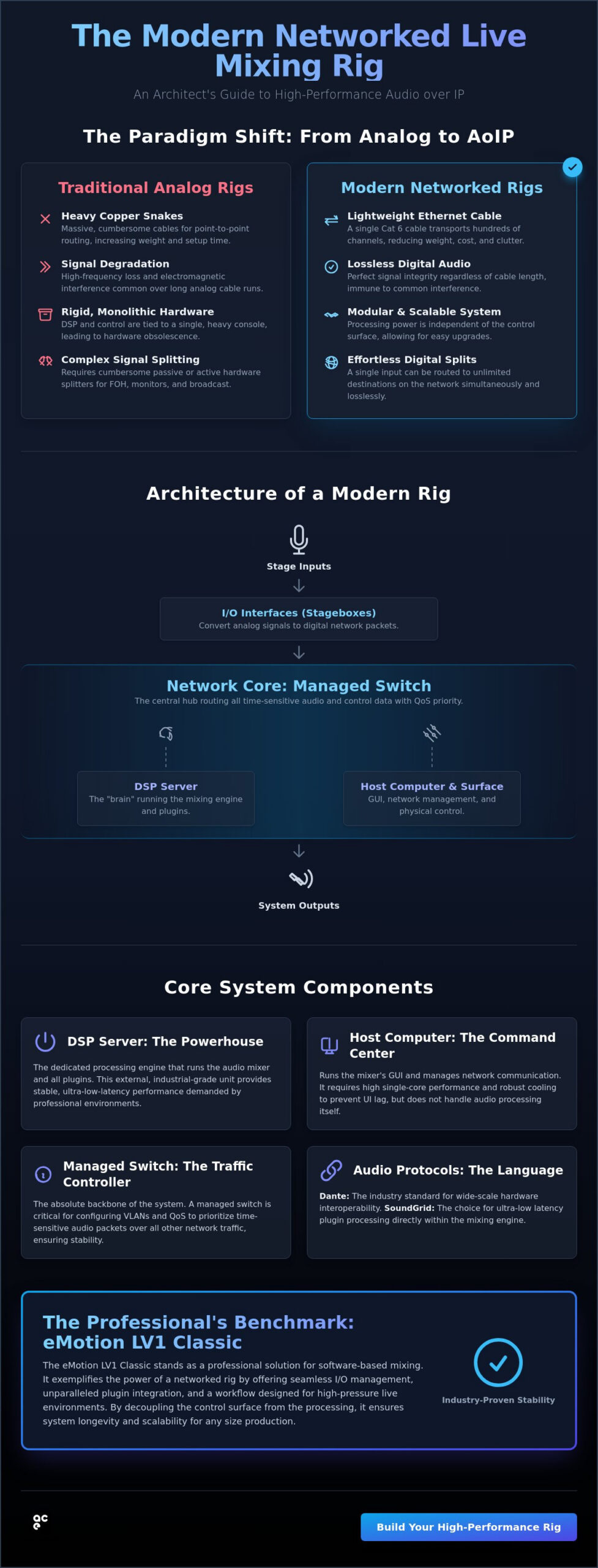
A networked live mixing rig is a decentralized audio system where input/output (I/O), signal processing, and user control function as separate nodes on a high-speed data network. This architecture replaces the traditional model of a single, self-contained console. In legacy setups, massive copper snakes carried individual analog signals from the stage to a fixed position, often resulting in signal degradation and physical clutter. Modern professional rigs utilize Audio over IP (AoIP) to transport hundreds of high-resolution channels over a single Category 6 cable. This modularity allows for the physical separation of components. You can place stageboxes at the source, house DSP servers in a remote rack, and operate the GUI from a dedicated surface anywhere on the network.
Standard IT hardware plays a vital role in this ecosystem. Managed network switches act as the traffic controllers, ensuring that time-critical audio packets receive priority over control data. By leveraging established Ethernet standards, engineers build systems that are significantly more flexible than proprietary hardware. This shift allows for a more agile approach to live sound, where the network itself becomes the backbone of the production.
The Advantages of AoIP in Live Sound
Adopting AoIP protocols offers significant advantages for touring and large-scale installations. The most immediate benefit is the drastic reduction in cable weight. Replacing a 300-foot analog snake with a lightweight Ethernet cable reduces shipping costs and simplifies load-in. Digital signal distribution is entirely lossless. You won’t experience the high-frequency roll-off or electromagnetic interference common in long analog cable runs. This setup also simplifies the routing of complex signal splits. A single preamp on stage can feed FOH, monitor, and broadcast positions simultaneously without the need for cumbersome passive or active splitters.
Software-Defined Mixing vs. Traditional Consoles
Understanding how to integrate software audio consoles is key to mastering the modern rig. These systems decouple the user interface from the processing engine. Traditional consoles often face hardware obsolescence because the DSP is hard-wired to the physical surface. In a software-defined environment, the mixing engine runs on external, industrial-grade servers. This means you can upgrade your processing power or update your software features without discarding your physical investment. It’s a pragmatic approach to system longevity. These servers are built for high-pressure environments, providing the stable, low-latency performance that professional engineers demand. Moving away from fixed hardware allows for a more responsive and customizable workflow.
Core Components: Hardware, Software, and Protocols
Building a networked live mixing rig requires a precise selection of hardware to ensure stability under load. The host computer serves as the command center, running the Graphic User Interface (GUI) and managing network communication. While it’s tempting to use a standard consumer laptop, professional environments demand machines with high single-core performance and robust thermal management. A system that throttles under heat causes UI lag or software instability, which is unacceptable during a live show. Your host computer doesn’t need to handle audio processing, but it must remain responsive while managing hundreds of network channels.
I/O interfaces act as the entry and exit points for the network, converting stage signals into digital packets. The stability of these packets depends entirely on the network switch. You must use managed switches to configure Virtual Local Area Networks (VLANs) and Quality of Service (QoS). These settings ensure that time-sensitive audio data always takes priority over non-essential control traffic. For a deeper dive into these configurations, consult specialized resources like Basic Networking For Live Sound to understand the building blocks of a stable infrastructure.
Selecting the Right Audio Protocol
Protocols define how data moves across your networked live mixing rig. SoundGrid is the preferred choice for engineers who require ultra-low latency plugin processing directly within the mixing engine. Dante remains the industry standard for wide-scale hardware interoperability, supported by over 4,500 devices as of April 2026. For high-end fixed installations, AVB and Milan offer deterministic networking, though they require specific AVB-capable switches. Choosing a protocol often depends on your existing hardware inventory and the required channel count at various sample rates.
The Role of Digital Signal Processing (DSP)
Professional rigs rely on external DSP servers rather than the host computer’s CPU. Native processing is subject to the unpredictable nature of operating system interrupts, which leads to jitter and increased latency. Dedicated servers provide sub-1ms processing speeds, making them essential for monitor mixes where timing is critical. Implementing a redundancy strategy is a standard practice for tour-grade systems. By using a primary and backup server setup, the system can automatically switch to the secondary unit if the primary hardware fails. If you’re ready to transition to a more robust architecture, the eMotion LV1 Classic offers a professional, hardware-integrated path to this level of processing power.
Blueprint for Scalability: Rig Configuration Templates
Scalability is a core advantage of decentralized audio. Unlike fixed-format consoles, a networked live mixing rig expands or contracts based on the specific requirements of the production. This modularity allows engineers to maintain a consistent workflow across different venue sizes while only deploying the necessary hardware. By utilizing standardized protocols, you can transition from a small club setup to a large-scale festival system without redesigning your signal flow or processing chain.
The Compact Fly-Rig Template
For international touring and fly-dates, portability is the primary constraint. A professional fly-rig typically consists of a high-performance laptop, a compact I/O interface like the RME Digiface Dante, and a half-rack DSP server. Keeping the entire system under 23kg is critical for avoiding excess baggage fees and ensuring the rig fits in standard overhead compartments. Cabling is minimized to a few short Category 6 patches and a compact managed switch. This configuration allows for a 15-minute load-in, providing the engineer with a consistent mixing environment regardless of the local PA provided by the venue.
Medium venues and Houses of Worship often prioritize remote control and accessibility. In these environments, the rig configuration emphasizes network-wide access. This allows monitor engineers or musicians to control their own mixes via tablets. For volunteer-based operations, the user interface can be restricted to specific layers, preventing accidental changes to critical system gain structures or clocking settings. This template balances high-performance processing with a user-friendly operational layer.
The High-Channel Count Touring Template
Large-scale productions require maximum I/O density and full hardware redundancy. In this blueprint, the eMotion LV1 Classic serves as the central hub, managing up to 64 or 80 channels of audio. Stageboxes are typically connected over fiber optic lines using SFP modules to ensure signal integrity over long distances. This configuration supports multi-surface control, where FOH and Monitor engineers share the same network backbone but operate on independent processing nodes. It’s a robust solution for festivals where quick changeovers and high channel counts are non-negotiable.
Broadcast and streaming environments add the requirement of multi-track recording and DAW integration. By utilizing a networked live mixing rig, you can route every input directly to a recording machine without physical splitters. This enables high-quality live tracking for post-production or real-time streaming mixes. Integrating a Pro Tools Ultimate subscription into the network allows for seamless tracking and virtual soundcheck capabilities, which are essential for maintaining professional standards in modern live broadcast scenarios.
Implementation Guide: Optimizing Stability and Latency
The reliability of a networked live mixing rig depends on the precision of its configuration. While hardware quality is a baseline, the software and network settings determine whether the system remains stable under the pressure of a full-scale production. Success in this environment requires a methodical approach to synchronization and resource management. If these foundational elements are neglected, even the most expensive components will suffer from performance bottlenecks or audible artifacts.
Clocking is the most critical factor in any digital ecosystem. You must establish a single, solid Master Clock across all network devices to prevent clicks, pops, or synchronization drift. In a SoundGrid or Dante environment, one device must be designated as the Leader, with all other nodes following its timing. Buffer sizes also require careful calibration. Lowering the buffer reduces latency but increases the load on your DSP servers and host CPU. For professional live sound, you should aim for the smallest buffer size that maintains a stable CPU overhead, typically providing a round-trip latency of under 2ms. A comprehensive approach to managing live audio latency requires addressing not just buffer settings but the entire network architecture, from driver optimization to DSP offloading strategies.
System optimization extends to the host computer’s operating system. You must disable all unnecessary background services, including Wi-Fi, Bluetooth, and automatic updates. These processes can cause unpredictable CPU spikes that lead to audio dropouts. Before every show, perform a stress test by running the system at full channel capacity with all plugin chains active. This routine ensures the hardware can handle the thermal and processing demands of the actual performance.
Eliminating Audio Dropouts
Audio dropouts are often the result of network jitter or packet loss. You can diagnose these issues using protocol-specific monitoring tools that track late packets and clock sync errors. In environments with high radio frequency (RF) interference, such as large festivals, using shielded Cat6a or Cat7 cabling is mandatory to maintain signal integrity. Configuring Quality of Service (QoS) on your managed switches is another essential step. This ensures that time-sensitive audio packets are prioritized over control data, preventing network congestion from affecting your audio stream.
Optimizing the Software Console
Efficient plugin management is key to maintaining low latency. You should structure your signal flow to minimize serial processing, as each plugin in a chain adds to the total delay. Utilizing live audio mixing software allows you to create detailed snapshots for different song sections, ensuring precise recall of gain, EQ, and routing. Session templates reduce setup time by 40% by providing a pre-configured starting point for I/O and plugin routing. If you need to expand your system’s capabilities, you can buy professional audio licenses to unlock additional processing power and channel counts.
The eMotion LV1 Classic: The Professional Solution for Networked Mixing
The eMotion LV1 Classic represents the most refined implementation of a networked live mixing rig. It’s designed to handle the complexities of modern touring by integrating the mixing engine directly with the SoundGrid network protocol. Unlike traditional consoles that rely on fixed internal processing, the LV1 uses external DSP servers to maintain sub-1ms latency across all 64 stereo channels. This architecture ensures that the system remains responsive even when demanding plugin chains are active. It’s a pragmatic solution for engineers who require the sonic precision of a studio environment within a live venue.
Tactile control is a primary concern when transitioning to software-based systems. The LV1 Classic addresses this by offering a hybrid interface. You can operate the rig using high-resolution touchscreens for fast navigation or integrate physical fader banks for traditional tactile feedback. This flexibility allows you to tailor the control surface to your specific workflow. Whether you’re managing a compact fly-rig or a high-channel count networked live mixing rig, the system adapts to the physical constraints of your workspace without compromising processing power.
Adopting a software-centric approach future-proofs your audio inventory. Traditional hardware consoles often face obsolescence when their internal processing reaches its limit. With the LV1, you can upgrade your DSP servers or update the software to access new features without replacing the entire console surface. This logic ensures that your system remains relevant as production demands increase, allowing for a more sustainable and cost-effective equipment lifecycle.
Key Features for Modern Engineers
The system provides 64 stereo channels with full processing available on every strip. Version 16 of the software introduces enhanced DSP efficiency and refined “Scenes & Recall Safe” filters, which are essential for managing complex show files. Every channel strip offers direct access to the world’s largest library of professional plugins. You can integrate tools like the Sonnox Vocal Production Bundle or the Eastwest Hollywood orchestra Opus Edition directly into your live signal chain. Customizable workspace layouts allow you to create a UI that matches your specific mixing style, improving efficiency during high-pressure events.
Acquiring Your Rig via Meershop
Meershop acts as an expert facilitator for audio professionals in the Netherlands. We provide specialized bundles that include the eMotion LV1 Classic software, dedicated SoundGrid servers, and high-performance I/O interfaces. Our approach is utilitarian and transparent; we focus on delivering the specific tools you need for a stable and efficient workflow. We provide professional support to ensure your system is configured correctly for national touring or fixed installations. You can explore the eMotion LV1 Classic at Meershop to find the configuration that matches your technical requirements.
Deploying Your High-Performance Audio Infrastructure
Transitioning to a networked live mixing rig is a strategic move toward a decentralized, high-performance ecosystem. This blueprint has detailed how modular architecture reduces physical complexity while increasing processing power through external DSP servers. By mastering network clocking and buffer optimization, you ensure the low-latency stability required for professional monitoring and broadcast environments. Software-defined solutions like the eMotion LV1 Classic provide the longevity needed in a rapidly evolving industry.
Meershop serves as a specialized partner for audio professionals. As an authorized reseller for Waves and Sonnox, we provide technical support tailored to national requirements in the Netherlands. We maintain a comprehensive stock of eMotion LV1 Classic components and DSP servers to ensure your system is ready for the next tour or installation. View Professional Live Mixing Solutions at Meershop to find the precise tools for your configuration. Implementing these technical frameworks allows you to focus on the mix rather than hardware limitations.
Frequently Asked Questions
What is the maximum latency acceptable for a live monitor mix?
Professional standards for monitor mixes require a total round-trip latency of less than 5 milliseconds. Performers using in-ear monitors (IEMs) are particularly sensitive to delay, as it causes phasing issues with their own bone-conducted voice. Achieving sub-2ms latency is the benchmark for high-end systems, ensuring that the audio feels instantaneous and natural for the artist.
Can I run a networked live mixing rig on a standard office laptop?
You shouldn’t use a standard office laptop for a professional networked live mixing rig. These machines aren’t designed for the sustained high-CPU loads and thermal demands of live audio processing. They often feature aggressive power-saving measures that cause unpredictable CPU spikes or throttling. A dedicated host computer with high single-core performance and robust cooling is essential for maintaining UI responsiveness and system stability.
Do I need a managed switch for a simple 16-channel networked rig?
Yes, a managed switch is mandatory even for lower channel counts. Unmanaged switches can’t prioritize time-sensitive audio packets over control data, which leads to packet loss and audible dropouts. You need the ability to configure Quality of Service (QoS) and disable Energy Efficient Ethernet (EEE) to ensure the network remains stable and low-latency under all conditions.
How does a networked rig handle power failures compared to analog?
Networked systems are more vulnerable to power interruptions than analog setups because they require time to reboot and re-establish network synchronization. While an analog console passes audio almost immediately after power is restored, a digital rig might take several minutes to come back online. It’s standard practice to use an Uninterruptible Power Supply (UPS) for all network switches, servers, and host computers to bridge short power dips.
Can I integrate my existing analog outboard gear into a networked rig?
You can integrate analog outboard gear by using I/O interfaces that act as bridges between the analog and digital domains. These interfaces convert the analog signal into network-compatible packets, such as Dante or SoundGrid, and vice-versa. This allows you to insert your favorite analog compressors or EQs into digital channel strips, though you must account for the additional AD/DA conversion latency in your signal chain.
What happens if the host computer crashes during a live performance?
If the host computer crashes in a properly configured networked live mixing rig, the audio processing usually continues uninterrupted. In systems like the eMotion LV1 Classic, the audio engine runs on an external DSP server rather than the host computer. You’ll lose the visual interface and control temporarily, but the audio will keep flowing while you reboot the host or switch to a redundant control surface.
Is it possible to record all channels individually over the same network?
Recording every channel individually is a standard feature of networked rigs. By connecting a recording computer to the same network switch, you can capture a multi-track recording of the entire performance using a DAW like Pro Tools Ultimate. This process doesn’t require extra physical splitters or cabling, as the audio data is already present on the network and can be routed to multiple destinations simultaneously.
How many DSP servers can I link for extra processing power?
The number of linked servers depends on the specific software and protocol requirements. For a live mixing environment using SoundGrid, the focus is typically on redundancy rather than cumulative processing power. You’ll generally use one primary DSP server to handle the audio processing and a second identical server as a mirrored backup that takes over automatically if the primary hardware fails.
YOU MIGHT ALSO LIKE