Nederlands
Understanding Live Audio Mixing Software: A Professional Guide for 2026
The traditional large-format mixing console is no longer the mandatory anchor of a professional front-of-house setup. While physical hardware remains common, the strategic shift toward live audio mixing software has moved from a niche experiment to a standard professional requirement in 2026. This evolution allows for greater portability and deeper integration with digital plugins, but it also introduces new technical demands on your system’s processing power.
It’s understandable to prioritize stability; the risk of system failure mid-performance or the presence of audible latency can compromise any production. However, when you implement a dedicated DSP-offload architecture, these concerns become manageable technical variables rather than unpredictable threats. This guide provides a technical overview of transitioning to a software-based environment without sacrificing reliability. We’ll examine the specific architecture required for a professional rig, methods to mitigate stability risks, and professional-grade software options like the eMotion LV1 to ensure your live sound workflow is both efficient and secure.
Key Takeaways
- Understand how software-defined audio processing is replacing fixed-architecture hardware to provide greater flexibility in professional live environments.
- Identify the specific CPU, thermal management, and I/O interface requirements necessary to maintain a stable host system in 2026.
- Learn to mitigate performance risks by establishing acceptable latency thresholds and redundant architectures for live audio mixing software.
- Discover how to integrate studio-grade tools and customized user interfaces to build a workflow tailored to specific engineering needs.
- Evaluate software options based on production scale and ecosystem compatibility to ensure seamless integration with your existing stageboxes and hardware.
Defining Live Audio Mixing Software in a Hardware-First Industry
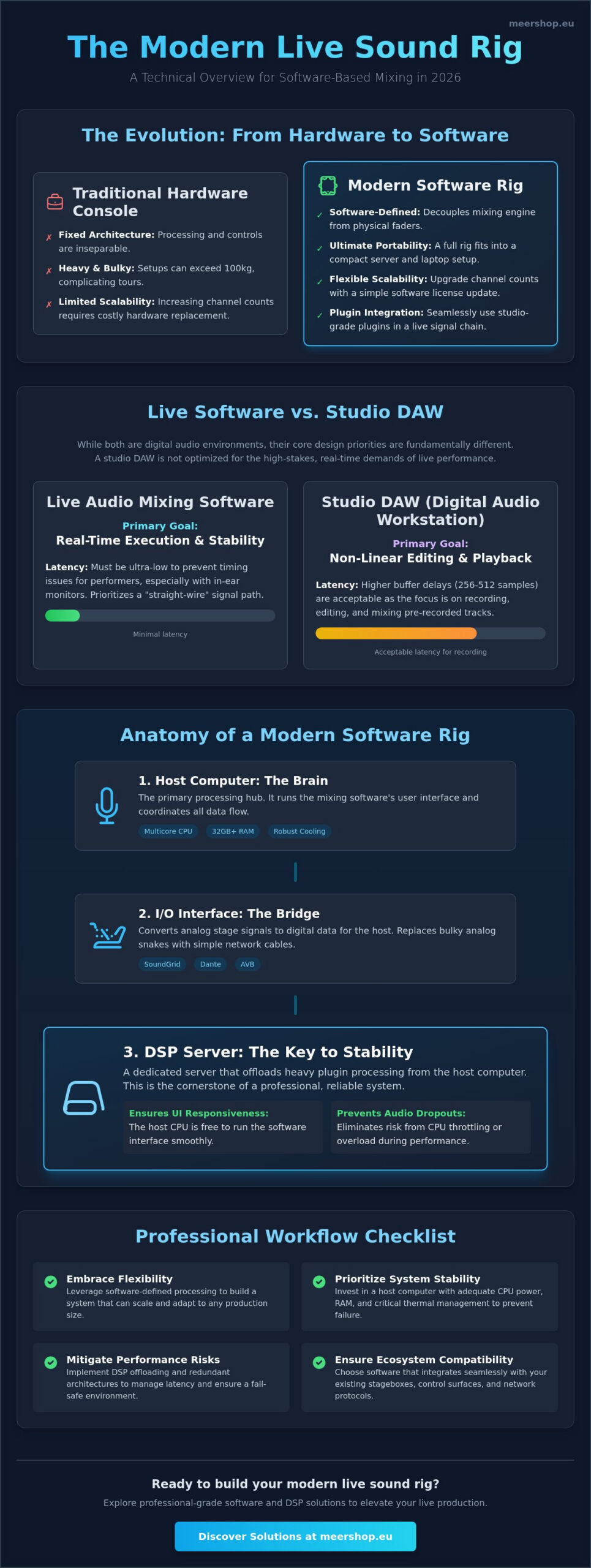
In its most direct form, live audio mixing software is a digital platform that replaces the physical control surface of a traditional mixing console with a virtual interface. Historically, the industry relied on fixed-architecture hardware where the processing power and the user interface were inseparable. We are currently seeing a definitive transition toward software-defined audio processing. This shift allows engineers to decouple the mixing engine from physical faders, utilizing standard computer processors to handle complex signal routing and effects processing.
Professional engineers are migrating to software solutions for several practical reasons. Portability is a major factor; a software-based rig can reduce a touring setup from a 100kg console to a compact server and laptop configuration. Scalability is equally important. Increasing channel counts often requires a simple software license update rather than a total hardware replacement. Additionally, software allows for the seamless integration of studio-grade plugins, such as the Sonnox Vocal Production Bundle, directly into the live signal chain.
The Evolution from Digital Consoles to Software Hosts
Digital consoles initially used proprietary DSP chips to mimic analog workflows. As general-purpose CPUs became more powerful and stable, manufacturers began migrating these mixing engines into standard computer environments. High-resolution touch-screen technology provided the tactile interface needed to remove physical fader banks without losing control precision. In this modern architecture, the host computer acts as the central nervous system of a live rig, coordinating data flow between input sources, processing engines, and output destinations. Live sound mixing has moved from turning physical knobs to managing data packets across high-speed networks.
Software Mixing vs. Studio DAWs
It’s a mistake to assume a studio Digital Audio Workstation (DAW) is suitable for high-stakes live performance. While a DAW like Pro Tools Ultimate is the industry standard for non-linear editing and studio production, it isn’t optimized for real-time execution. The primary requirement for live audio mixing software is low-latency throughput. In a studio, a buffer delay of 256 or 512 samples is acceptable because the focus is on playback and overdubbing. In a live setting, even minimal delay can ruin a performer’s timing, especially when using in-ear monitors. Live software prioritizes a “straight-wire” signal path and system stability over the complex editing and arrangement features found in studio environments.
The Technical Components of a Modern Software Mixing Rig
A professional rig for live audio mixing software is a modular system where every component must meet specific performance standards. In 2026, the host computer serves as the primary processing hub. It requires a multicore CPU with high single-core clock speeds and a minimum of 32GB of RAM to handle complex signal paths. Thermal management is often overlooked but remains a critical failure point. If a processor reaches its thermal limit and throttles, the resulting audio dropouts can compromise a performance. Industrial-grade rackmount computers or laptops with robust cooling systems are necessary for touring environments.
The I/O interface acts as the bridge between the analog stage and the digital host. It converts microphone and line signals into digital data packets. For high-stakes events, these interfaces must support high-bandwidth protocols like SoundGrid, Dante, or AVB. Using these networking standards allows you to route audio across long distances using standard Cat6 cabling, which simplifies cable management compared to traditional analog snakes. Learning How To Mix Sound for Live Performance involves mastering these digital routing paths as much as it does understanding EQ and dynamics.
DSP Offloading: The Key to Professional Performance
Relying solely on a computer’s native CPU for audio processing is risky for large-scale shows. Dedicated DSP servers offload the heavy lifting of plugin processing, ensuring the host computer’s resources are reserved for the user interface and system stability. This separation prevents the UI from becoming sluggish when you’re running complex chains like the Sonnox Vocal Production Bundle. The eMotion LV1 Classic stands as a leader in this category, providing a hardware-integrated software environment that mimics the reliability of a standalone console.
Input/Output (I/O) Architecture
Stagebox selection determines the initial sound quality of your mix. High-quality preamps with transparent conversion are essential before the signal ever reaches your software. Managing high channel counts at 96kHz requires a stable connection, typically via Thunderbolt or SoundGrid Ethernet. When building your rig, consider these factors:
- Bandwidth: Ensure your network switch can handle the total data throughput of all connected I/O devices.
- Redundancy: Professional setups often use secondary network paths to prevent total system failure if a cable is damaged.
- Synchronization: A stable master clock is required to prevent digital clicks and pops across the network.
If you’re looking to upgrade your current setup, you can explore professional I/O solutions that integrate directly with modern software hosts. For a deeper technical framework on structuring these components, our guide on building a professional networked live mixing rig covers the logical signal flow and network architecture required for scalable, high-performance production.
Overcoming the Risk Factor: Stability, Latency, and Redundant Systems
The primary concern for any engineer transitioning to live audio mixing software is the perceived risk of system failure. In a live environment, a software crash isn’t just an inconvenience; it’s a complete cessation of the performance. Reliability is built through meticulous system optimization and the implementation of redundant architectures. Stability begins at the operating system level. Professional rigs often use “stripped” versions of Windows or macOS where background tasks, automatic updates, and unnecessary telemetry are disabled to ensure the CPU prioritizes audio processing above all else.
Latency remains the most critical technical metric. This “round-trip” time represents the delay from the moment sound enters a microphone until it exits a speaker. While Front of House (FOH) positions can often tolerate a slight delay of 5 to 10 milliseconds, performers using In-Ear Monitors (IEMs) require much tighter thresholds. For IEMs, latency must stay below 5 milliseconds to avoid the “comb filtering” effect caused by the singer’s bone conduction mixing with the delayed electronic signal. Ideally, professional systems aim for sub-2ms performance to ensure a natural monitoring experience. A comprehensive approach to managing live audio latency requires addressing not just buffer sizes but the entire network architecture of your rig.
Redundancy Strategies for Live Audio
Professional tours don’t rely on a single computer. Instead, they utilize “A/B” redundancy where two identical software hosts run in perfect synchronization. A specialized hardware switch monitors the “heartbeat” of the primary system. If the primary host fails or the software hangs, the switch instantly routes the audio and control data to the secondary host. This transition is often so fast that it’s imperceptible to the audience. Modern software mixing environments often provide superior redundancy compared to legacy hardware because it’s more practical to deploy two synchronized computers than two full-sized physical consoles.
Latency Management Techniques
Managing latency is a balance between CPU load and buffer size. A smaller buffer reduces delay but increases the strain on the processor. To achieve professional results, engineers use high-speed networking protocols and dedicated DSP servers to keep the buffer at 32 or 64 samples. Specific live audio mixing software is built on a real-time processing kernel, which is specifically optimized for sub-1ms performance. These systems bypass the standard audio drivers of the operating system to ensure the most direct path from input to output. Testing these systems under full load before a show is the only way to build the psychological trust necessary for high-stakes production.
- System Stress Testing: Run the rig at 110% of its expected channel count for several hours to identify thermal or processing bottlenecks.
- UPS Integration: Every component in the software rig must be connected to an Uninterruptible Power Supply to prevent data corruption during power fluctuations.
- Physical Locking: Use high-quality, locking Ethernet and power connectors to prevent accidental disconnections during a performance.
Key Features to Evaluate in Live Mixing Software
Selecting the right live audio mixing software requires looking beyond basic channel counts and routing capabilities. Professional production demands advanced tools like Digitally Controlled Amplifiers (DCA) groups, sophisticated delay compensation, and granular bus processing. These features ensure that even complex mixes with high channel counts remain coherent and phase-aligned. Scene management is another critical factor. A robust snapshot system allows you to recall entire console states, including plugin parameters and routing, for different songs or acts within a single performance.
Remote control functionality has become a standard requirement for modern engineers. High-performance software allows you to mix from a tablet via a secure Wi-Fi connection. This mobility enables you to check the frequency response and balance from various positions within the venue. It ensures the audience’s perspective matches the engineer’s intent at the FOH position. Without this flexibility, you’re limited to the acoustic characteristics of the mix position, which rarely represents the entire room.
Plugin Hosting and Processing Power
One of the most significant advantages of a software-based rig is the ability to use the same studio-grade tools on stage that were used during the recording process. Using a zero-latency plugin wrapper is essential to avoid the processing delays associated with standard VST hosting. This integration provides a level of consistency that hardware consoles struggle to match. For example, integrating the Sonnox Vocal Production Bundle allows you to achieve studio-quality vocal clarity and dynamic control in a live setting without introducing perceptible latency.
Workflow and Ergonomics
The efficiency of your workflow depends on the software’s user interface (UI) and how well it translates to tactile control. Professional live audio mixing software is optimized for multi-touch displays, allowing for simultaneous adjustments of faders, pans, and EQ points. Custom layers and fader banks are necessary to bring critical channels to the surface quickly, especially during high-pressure moments. Visual feedback must be instantaneous; high-resolution metering and integrated Real Time Analyzers (RTA) provide the data needed to make informed decisions about frequency build-ups or feedback risks.
If you’re ready to transition to a more flexible processing environment, you can view our professional audio software licenses to find a solution that fits your production scale.
Choosing the Right Software for Professional Live Production
Selecting the right live audio mixing software is a strategic decision that depends on the specific demands of your production environment. A small club setup might function reliably on native CPU processing, but stadium-level productions require the stability of external DSP servers to handle high channel counts. You must evaluate the scale of your typical show before committing to a platform. A system that is over-engineered for a 16-channel acoustic set might be unnecessarily complex, while a native-only solution will likely fail under the pressure of a 128-channel orchestral broadcast.
Ecosystem compatibility is the next critical factor. Your software must communicate flawlessly with your existing stageboxes and network protocols, whether you’re using MADI, Dante, or SoundGrid. Switching to a new software host often requires a parallel investment in compatible I/O hardware to ensure clocking stability and low-latency performance. If your current inventory consists of high-end analog preamps, you’ll need interfaces with transparent A/D conversion that the software can control remotely. This integration is vital for maintaining a fast workflow during tight changeovers on the Netherlands touring circuit.
Professional support isn’t a luxury; it’s a mission-critical requirement. Relying on community forums during a soundcheck is not a viable strategy for high-stakes events. You need manufacturer-backed technical support and a platform that receives regular firmware and feature updates. Future-proofing your rig means choosing a developer with a proven track record of supporting new operating systems and hardware standards. This ensures your investment remains relevant as computer processing technology continues to evolve over the next several years.
The eMotion LV1 Ecosystem
The eMotion LV1 is widely considered the gold standard for software-based live mixing due to its modularity and reliability. It’s built specifically for the live environment, bypassing the limitations of standard operating system audio drivers. The system integrates deeply with SoundGrid servers, which provide the dedicated processing power needed for rock-solid stability even when running heavy plugin chains. For engineers looking to move away from bulky traditional consoles without losing professional-grade features, the eMotion LV1 Classic provides a comprehensive hardware-integrated solution that simplifies the transition to a software-defined workflow.
The Meershop Advantage for Professionals
Building a networked live mixing rig from scratch requires more than just a software license; it requires a cohesive strategy involving hardware, networking, and software optimization. We provide access to professional licensing and specialized audio hardware designed to meet the rigors of the road. Our role is to act as an expert facilitator, helping you navigate the technical nuances of digital routing and DSP offloading. If you’re ready to modernize your audio environment, you can browse our professional live audio software collection at Meershop to find the tools necessary for a reliable, low-latency performance.
Modernizing Your Live Sound Architecture
Adopting live audio mixing software is a strategic move that aligns your production capabilities with the technical standards of 2026. Success in this transition depends on a well-designed architecture that prioritizes DSP offloading and system redundancy to eliminate the risks of latency or failure. By integrating professional processing engines and high-bandwidth I/O, you can achieve a level of sonic precision and workflow flexibility that traditional hardware consoles simply cannot match.
As an authorized reseller for industry-leading software developers, Meershop is your partner in specialized digital licensing. We provide the technical expertise and hardware resources necessary to build a secure, high-performance rig. With reliable national shipping across the Netherlands, you can access the tools required for your next production without logistical delays. Upgrade your live rig with professional mixing software at Meershop and take full control of your audio environment. The future of live sound is software-defined, and the transition has never been more accessible.
Frequently Asked Questions
Can I use any laptop for live audio mixing software?
You cannot use a standard consumer laptop for professional live mixing. A professional rig requires a machine with high single-core clock speeds, a minimum of 16GB RAM, and robust thermal management to prevent CPU throttling. If the processor overheats, it will reduce performance, leading to audible glitches or system crashes during the show. Industrial-grade laptops or rackmount computers are the preferred choice for touring environments.
What is the maximum acceptable latency for live monitor mixing?
The maximum acceptable latency for in-ear monitors is 5 milliseconds. If delay exceeds this threshold, performers experience comb filtering and timing issues due to the phase difference between bone conduction and the electronic signal. For Front of House mixing, thresholds are more flexible, often allowing up to 10 milliseconds without impacting the audience’s experience. Professional systems aim for sub-2ms performance to ensure a natural feel.
Does software mixing require a special type of audio interface?
Yes, professional live audio mixing software requires high-bandwidth interfaces to ensure low-latency performance. Standard USB 2.0 interfaces often lack the stability and throughput necessary for high channel counts. Instead, look for interfaces supporting Thunderbolt, SoundGrid, or Dante protocols. These provide the necessary data speeds and clocking stability required for real-time audio processing across a professional network.
What happens if my computer crashes during a live performance?
Without a redundant system, a computer crash will result in a total loss of audio. Professional engineers mitigate this risk by using an A/B redundancy setup where two synchronized computers run the same session. If the primary host fails, a hardware switch instantly transfers the audio stream to the secondary machine. This transition is often imperceptible to the audience, ensuring the performance continues without interruption.
Can I use my studio VST plugins in a live mixing software environment?
You can use VST plugins, but you must select those optimized for low-latency performance. Plugins with high internal look-ahead or heavy processing requirements will introduce unacceptable delay into the signal chain. Using a dedicated hosting environment allows you to integrate studio-grade tools, such as the Sonnox Vocal Production Bundle, while maintaining the sub-2ms speeds required for live sound environments.
Is a physical control surface necessary when using mixing software?
A physical control surface isn’t strictly required, as most software supports multi-touch displays, but it’s highly recommended for professional use. Tactile faders and encoders allow for faster adjustments and simultaneous control of multiple parameters during a show. Many engineers prefer a hybrid setup that combines touch-screen flexibility with a compact physical surface for critical channel management and rapid access to fader layers.
How does software mixing compare to traditional digital consoles in price?
Software mixing typically offers a lower entry cost compared to large-format digital consoles, though the total investment scales with your hardware choices. While the software license itself is affordable, you must account for the cost of a high-performance host computer, DSP servers, and I/O interfaces. This modular approach allows you to build a system that matches your specific production needs without paying for unused physical faders.
What is the difference between native and DSP-offload software mixing?
Native mixing relies entirely on your computer’s internal CPU to process audio and plugins. In contrast, DSP-offload mixing uses an external server to handle the heavy processing tasks. This offloading ensures that the live audio mixing software interface remains responsive and prevents the host computer from crashing under heavy loads. For high-stakes professional tours in the Netherlands, DSP-offload architecture is the industry standard for reliability.